 Infozion Technologies LLPInfozion Technologies LLP




10 ERP implementation mistakes and How to Avoid Them
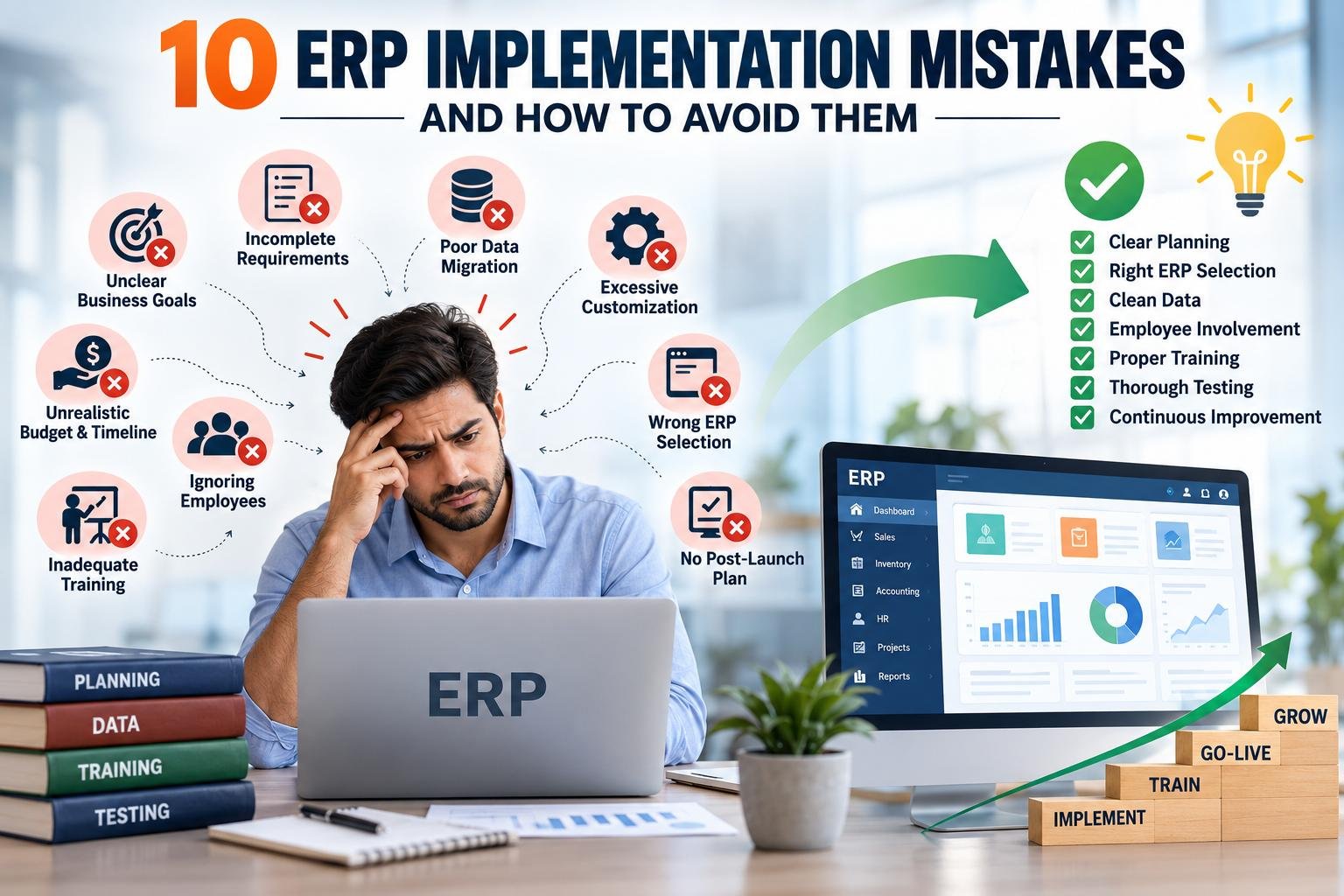
10 ERP implementation mistakes and How to Avoid Them
ERP implementation mistakes can turn a promising business transformation project into a costly, delayed, and frustrating experience. An ERP system is designed to connect departments, centralize business data, automate repetitive processes, and give management better visibility. However, simply choosing ERP software does not guarantee these results.
The real difference comes from how the system is planned, configured, tested, introduced to employees, and improved after launch.
Many organizations focus heavily on software features but underestimate people, processes, data quality, training, and realistic planning. That is where most ERP implementation challenges begin.
The good news is that many implementation problems are preventable.
In this guide, we will explain 10 major common ERP implementation mistakes, why they happen, how they affect businesses, and the ERP implementation best practices that can help you avoid them.
If your organization is evaluating an ERP platform or planning to modernize existing operations, you can also explore Infozion’s ERP software solutions to understand how ERP can be aligned with different business requirements.
What Are the Biggest ERP implementation mistakes?
The biggest ERP implementation mistakes include starting without clear business goals, choosing software without understanding requirements, migrating poor-quality data, over-customizing the system, ignoring employees, providing inadequate training, rushing testing, setting unrealistic deadlines, and treating go-live as the end of the project.
A successful ERP implementation should connect technology with actual business processes. The goal is not simply to install software—it is to improve how the organization works.
ERP implementation mistakes: What Usually Goes Wrong?
ERP implementation affects multiple areas of a company at the same time.
Sales teams may change how they manage customers. Finance may move to new reporting processes. Inventory teams may need to follow different stock procedures. Management may receive information through completely new dashboards.
Because so many people and processes are involved, even one poor decision can affect several departments.
Most ERP implementation challenges are not caused by a single technical problem. They usually develop from a combination of unclear planning, unrealistic expectations, poor communication, weak data preparation, and insufficient employee involvement.
Here is a quick overview:
| Mistake | Possible Impact | Better Approach |
|---|---|---|
| Unclear goals | Scope confusion | Define measurable business objectives |
| Weak requirement analysis | Wrong features or modules | Map workflows before implementation |
| Wrong ERP selection | Low system fit | Evaluate operational requirements first |
| Unrealistic budget or timeline | Delays and cost overruns | Plan for testing, migration and training |
| Poor data migration | Incorrect reporting | Clean and validate data |
| Excessive customization | Higher complexity | Use standard functionality when possible |
| Ignoring employees | Resistance to adoption | Involve users early |
| Weak training | User errors | Provide role-based practical training |
| Inadequate testing | Go-live disruption | Test complete business scenarios |
| No post-launch plan | Long-term performance issues | Continue monitoring and improvement |
Now, let us examine each mistake in detail.
1. Starting ERP Implementation Without Clear Business Goals
One of the most serious common ERP implementation mistakes is beginning the project without clearly defining what the organization wants ERP to improve.
A company may say:
“We need ERP.”
But that statement does not explain the business problem.
Does the organization want to reduce manual data entry?
Improve inventory accuracy?
Connect sales and accounting?
Get real-time management reports?
Improve order processing?
Manage multiple locations through one platform?
These goals influence almost every implementation decision.
How to Avoid This Mistake
Before selecting modules or configuring workflows, create a set of measurable business objectives.
For example:
Instead of saying, “We want better inventory management,” define the goal more clearly:
“We want real-time stock visibility across all warehouses and fewer manual inventory adjustments.”
Clear goals make it easier to determine whether the ERP project is actually delivering value.
2. Skipping Detailed Business Requirement Analysis
ERP should adapt to real business requirements rather than forcing every department into an unsuitable workflow.
Companies sometimes start implementation after only a few management meetings. The implementation team may understand the high-level requirements but not the everyday processes employees actually follow.
That creates gaps.
For example, management may describe the sales process as:
Lead → Quotation → Order → Invoice.
But actual employees may also manage approval rules, special pricing, credit limits, product availability, partial deliveries, returns, and customer-specific conditions.
Ignoring these details is one of the biggest ERP implementation challenges.
How to Avoid It
Before configuration begins:
- Map existing workflows.
- Talk to department heads.
- Interview employees performing everyday tasks.
- Identify repetitive manual work.
- Document approval processes.
- Identify reporting requirements.
- List existing integrations.
- Separate essential requirements from optional features.
Requirement analysis gives the ERP implementation team a realistic picture of how the business operates.
3. Choosing ERP Software Based Only on Features or Price
A long list of features does not automatically make an ERP platform suitable for your organization.
Similarly, the cheapest system may become expensive if it requires excessive customization.
The right ERP should match your current business processes while still supporting future growth.
For example, a manufacturing company may require production planning and material management, while a logistics company may prioritize shipment workflows, customer documentation, invoicing, and operational visibility.
How to Avoid This Mistake
Evaluate ERP based on:
Business requirements, industry processes, integration requirements, number of users, scalability, reporting needs, deployment model, customization requirements, security requirements, and expected future growth.
Organizations considering a new platform can review Infozion’s ERP software page to understand how business-specific ERP solutions can be approached.
The key principle is simple:
Choose ERP around the business—not the business around the software.
4. Setting an Unrealistic Budget or Implementation Timeline
Businesses understandably want ERP implemented quickly.
However, setting an aggressive deadline without considering requirement analysis, configuration, data migration, integration, training, testing, and user feedback can create unnecessary pressure.
Teams may begin skipping important activities just to meet the launch date.
Testing gets shortened.
Training gets rushed.
Data is migrated without enough validation.
These shortcuts can create larger problems after launch.
How to Avoid It
One of the most important ERP implementation best practices is to divide the implementation into clear phases.
A typical project may include:
Discovery → Requirement Analysis → Planning → Configuration → Data Preparation → Integration → Testing → Training → Go-Live → Stabilization → Continuous Improvement.
Every phase should have a realistic timeline and clear ownership.
For a deeper explanation of these stages, read the ERP implementation phases guide. ERP implementation phases
5. Migrating Poor-Quality Data Into the New ERP
ERP can organize business information, but it cannot automatically make incorrect data accurate.
If duplicate customers, outdated suppliers, incorrect inventory values, incomplete product records, and inconsistent naming conventions are migrated into the new ERP, the organization simply transfers old problems into a new system.
Poor data can affect:
Reporting, inventory, customer records, financial analysis, procurement, dashboards, automation, and management decisions.
How to Avoid It
Clean data before migration.
Start by deciding which information actually needs to move.
Then:
Remove duplicate records.
Archive unnecessary historical information.
Standardize customer and supplier names.
Verify inventory quantities.
Check tax and financial information.
Validate important master data.
Perform a test migration before final migration.
Finally, ask relevant departments to verify the migrated data.
The principle is straightforward:
Clean ERP data creates trustworthy ERP reporting.
6. Over-Customizing the ERP System
Customization can be valuable when a business has genuine process requirements that standard ERP functionality cannot handle.
Problems begin when every existing workflow is copied exactly into the new system.
ERP implementation should sometimes simplify outdated processes instead of recreating them digitally.
Heavy customization can increase:
Development requirements, testing effort, maintenance complexity, upgrade difficulty, implementation time, and long-term cost.
How to Avoid It
Before approving customization, ask:
“Is this customization necessary for the business, or are we simply recreating an old process because people are familiar with it?”
Use standard ERP features where they meet the requirement.
Configure before customizing.
Customize only where there is a clear operational reason.
This approach is one of the most practical ERP implementation best practices for maintaining a scalable system.
7. Ignoring Employees and Change Management
ERP implementation is not only an IT project.
It changes how people work.
Employees who have used the same spreadsheet, accounting tool, approval method, or manual process for years may naturally question a new system.
If employees only see ERP for the first time shortly before launch, resistance becomes more likely.
This is one of the most overlooked common ERP implementation mistakes.
How to Avoid It
Include key users from different departments early in the implementation.
Explain:
Why the company is implementing ERP.
What problems the system is intended to solve.
How individual roles may change.
Which manual processes may disappear.
Where employees can provide feedback.
Department representatives can also participate in testing and provide practical feedback before go-live.
When employees participate in the project, ERP feels less like something being imposed on them and more like a system designed around their actual work.
8. Providing Generic or Insufficient ERP Training
A finance employee does not need exactly the same training as a warehouse employee.
A sales manager does not need the same training as an administrator.
Generic ERP training often overwhelms employees with features they may never use while failing to give enough practical experience with their everyday tasks.
How to Avoid This Mistake
Use role-based training.
Warehouse users should practice inventory transactions.
Sales teams should practice leads, quotations, orders, and customer workflows.
Finance teams should work through invoices, payments, reports, and relevant controls.
Managers should understand dashboards and reporting.
Whenever possible, training should use realistic business scenarios rather than purely theoretical demonstrations.
Training should also happen close enough to go-live that employees can remember what they learned.
9. Rushing ERP Testing Before Go-Live
Testing individual screens is not enough.
ERP workflows often cross multiple departments.
For example:
A salesperson creates an order.
Inventory confirms stock.
The warehouse prepares delivery.
Finance generates an invoice.
Management sees the transaction in reports.
If the company tests each function independently but never tests the entire process, important issues may remain hidden.
How to Avoid It
ERP testing should include:
Functional testing.
Integration testing.
Data validation.
Role and permission testing.
User acceptance testing.
End-to-end workflow testing.
Reporting verification.
Real employees should participate in User Acceptance Testing because they understand daily operational scenarios that implementation teams may overlook.
Businesses using Odoo or considering an Odoo rollout can also refer to Infozion’s Odoo ERP implementation process guide for a structured implementation workflow. Odoo ERP implementation process
10. Treating Go-Live as the End of ERP Implementation
The system is live.
That does not mean the project is finished.
Real-world ERP usage often reveals opportunities that were difficult to identify during testing.
Employees may discover unnecessary steps.
Reports may need refinement.
Automation rules may require adjustment.
Additional training may be needed.
Management may identify new dashboard requirements.
Businesses that stop evaluating ERP immediately after launch can miss much of its long-term value.
How to Avoid It
Create a post-go-live improvement plan.
During the first few weeks and months, monitor:
User feedback.
Process delays.
Data accuracy.
Reporting quality.
System usage.
Integration performance.
Repeated user errors.
Additional automation opportunities.
ERP should evolve with your business.
Continuous optimization is therefore one of the most important ERP implementation best practices.
How Can Businesses Avoid ERP implementation mistakes?
The simplest answer is to treat ERP implementation as a business transformation project rather than a software installation.
Businesses should:
- Define clear goals before selecting or configuring ERP.
- Document real workflows and requirements.
- Clean data before migration.
- Involve employees throughout the implementation.
- Avoid unnecessary customization.
- Test complete business processes.
- Train users according to their roles.
- Plan for improvement after go-live.
A structured checklist can make these activities easier to manage. If your organization is working with Odoo, Infozion’s Odoo ERP implementation checklist provides a step-by-step framework. Odoo ERP implementation checklist
What Does a Successful ERP Implementation Look Like?
A successful ERP implementation does not simply mean that the software is working.
It means employees can perform their work efficiently, departments share reliable information, managers have useful visibility, repetitive tasks are reduced, data is trustworthy, and the system can adapt as the organization grows.
The ERP should become part of normal business operations—not another tool employees have to work around.
Companies looking to plan or improve their ERP environment can explore Infozion’s ERP software solutions for business-focused ERP implementation and development.
What is the most common ERP implementation mistake?
One of the most common ERP implementation mistakes is starting implementation without clearly understanding business requirements. When requirements are incomplete, companies may select unsuitable modules, create unnecessary customization, or build workflows that employees struggle to use.
Why do ERP implementations face problems?
Most ERP implementation challenges come from a combination of poor planning, unclear goals, weak data preparation, limited user involvement, insufficient training, rushed testing, and unrealistic expectations.
How can ERP implementation risk be reduced?
Follow proven ERP implementation best practices such as requirement mapping, phased implementation, data cleaning, role-based training, user acceptance testing, realistic project planning, and continuous post-launch improvement.
Frequently Asked Questions
1. What are the most common ERP implementation mistakes?
The most common ERP implementation mistakes include unclear objectives, incomplete requirements, poor ERP selection, unrealistic timelines, weak data migration, unnecessary customization, insufficient employee involvement, inadequate training, limited testing, and lack of post-go-live optimization.
Understanding the full implementation journey before starting can prevent many of these problems. For additional context, read Infozion’s ERP implementation phases guide. ERP implementation phases
2. How can a company prepare before implementing ERP?
Start by mapping existing processes, identifying operational problems, documenting requirements, defining measurable goals, assigning project owners, reviewing existing data, and deciding which departments or modules should be implemented first.
Businesses using Odoo can follow the Odoo ERP implementation checklist for a more structured preparation process. Odoo ERP implementation checklist
3. Why is ERP requirement analysis important?
Requirement analysis helps the ERP implementation team understand how the business actually operates. It identifies workflows, approvals, reporting needs, integrations, pain points, and user expectations before configuration begins.
Without requirement analysis, businesses are more likely to experience ERP implementation challenges later in the project.
4. Should every ERP system be customized?
No. Customization should be used when a genuine business requirement cannot be handled effectively through standard ERP configuration.
Excessive customization can increase implementation time, maintenance effort, testing requirements, and future upgrade complexity.
A key part of ERP implementation best practices is to configure standard capabilities first and customize only where clear business value exists.
5. What is the correct ERP implementation process?
Although the exact process depends on the organization and ERP platform, a typical implementation includes requirement analysis, planning, system configuration, data migration, integrations, testing, user training, go-live, stabilization, and continuous improvement.
For an example of a detailed platform-specific process, read the Odoo ERP implementation process guide. Odoo ERP implementation process
6. How important is employee training during ERP implementation?
Employee training is critical because even a technically successful ERP system will deliver limited value if users cannot use it correctly.
Role-based training helps employees understand the exact processes they will perform every day. It also reduces errors, improves confidence, and increases system adoption.
7. Is ERP implementation finished after go-live?
No.
Go-live is the beginning of real-world ERP usage. Businesses should continue reviewing user feedback, process performance, reporting quality, data accuracy, automation opportunities, and new business requirements after launch.
Continuous improvement helps ensure the ERP continues supporting the organization as it grows.
8. How can businesses choose the right ERP solution?
Businesses should evaluate operational requirements, company size, number of users, industry processes, integrations, scalability, reporting requirements, deployment preferences, data security, customization needs, budget, and future expansion plans.
You can explore Infozion’s ERP software services to learn more about building an ERP solution around specific business processes.
Conclusion
ERP implementation mistakes are easier to prevent than to correct after the system goes live.
Successful ERP implementation begins with understanding the business—not the software. Clear objectives, detailed requirements, clean data, realistic timelines, employee involvement, practical training, comprehensive testing, and continuous improvement all contribute to a smoother implementation.
The organizations that achieve the most value from ERP do not treat it as a one-time technology installation. They treat it as an ongoing business improvement initiative.
By understanding common ERP implementation mistakes, preparing for major ERP implementation challenges, and following proven ERP implementation best practices, businesses can build an ERP environment that improves visibility, connects departments, reduces manual work, and supports long-term growth.