 Infozion Technologies LLPInfozion Technologies LLP




How E-Waste ERP Automates CPCB EPR Compliance: Complete Workflow, Reporting & Audit Guide for 2026
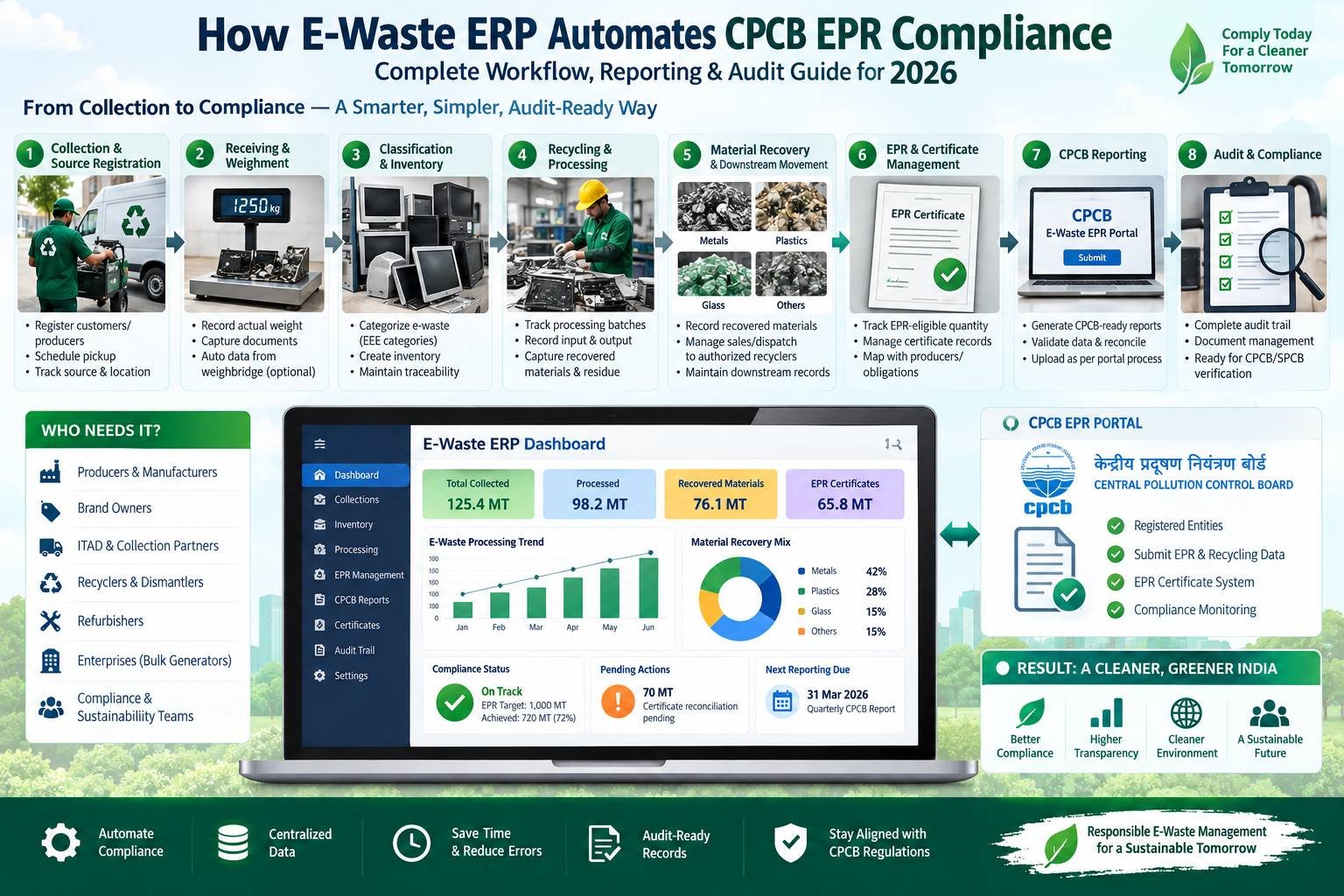
How E-Waste ERP Automates CPCB EPR Compliance: Complete Workflow, Reporting & Audit Guide for 2026
Managing e-waste compliance in India is no longer simply about maintaining a register of material received and recycled. Producers, recyclers, refurbishers and manufacturers may need to manage registrations, quantities, categories, processing records, downstream movement, EPR certificates, reporting data and supporting evidence across multiple transactions.
For businesses handling hundreds or thousands of records, spreadsheets and disconnected files can make reconciliation increasingly difficult.
This is where E-Waste ERP for EPR Compliance becomes valuable. Instead of treating compliance reporting as a separate activity performed at the end of a month or quarter, a properly configured ERP connects compliance data with daily operations—from collection and weighment to processing, material recovery, certificate tracking and audit preparation.
The objective is not to make compliance a one-time reporting exercise. It is to build the required data trail while the actual work is taking place.
Quick Answer: An E-Waste ERP can support CPCB EPR compliance by capturing operational data at each stage of the e-waste lifecycle, connecting collection and weight records with recycling batches, tracking EPR-related quantities and certificates, reconciling material movement, and preparing structured records for reporting and audit. Software supports compliance management, but businesses must still follow the applicable E-Waste Management Rules, CPCB procedures and current portal requirements.
Understanding EPR Compliance for E-Waste in India
India’s E-Waste (Management) Rules, 2022 came into force on 1 April 2023 and established an Extended Producer Responsibility framework for covered electrical and electronic equipment.
According to CPCB guidance, manufacturers, producers, refurbishers and recyclers are among the entities required to register on the E-Waste EPR Portal where applicable.
Under the EPR framework, compliance is closely connected with actual recycling activity and the EPR certificate system.
CPCB documentation states that recyclers upload information including quantities of e-waste procured or collected, quantities recycled, and end products produced and sold. EPR certificates are generated through the portal based on the applicable process, while producers fulfil their EPR obligations through eligible certificates from registered recyclers.
The regulatory framework therefore makes reliable operational data extremely important.
A compliance team should be able to answer questions such as:
Where did this material come from? How much was actually received? Which EEE category does it belong to? Which batch processed it? What quantity was recovered? What happened to non-recycled fractions? Which records support the recycling quantity? How does this activity reconcile with the EPR information being reported?
If those answers live in different Excel files, paper registers, emails and WhatsApp conversations, preparing a reliable compliance record becomes unnecessarily difficult.
What Is E-Waste ERP for EPR Compliance?
E-Waste ERP for EPR Compliance is an integrated business system configured to connect e-waste operations with the information required for compliance monitoring and reporting.
Unlike a standalone reporting spreadsheet, an ERP can create relationships between individual transactions.
For example, one collection record can be connected with its source, vehicle, receiving weight, category classification, inventory batch, processing batch, recovered outputs, residue, downstream transfer documents and compliance records.
The important distinction is this:
Traditional approach: Operations happen first. Compliance data is reconstructed later.
ERP-driven approach: Operations generate the compliance data as they happen.
That change can significantly improve traceability because reporting is based on actual operational records rather than data manually assembled months later.
Why Manual EPR Compliance Becomes Difficult
Excel is useful and can work for smaller operations with limited transactions. The problem usually begins when transaction volume, facilities, material categories and compliance requirements increase.
Imagine a recycler receiving e-waste from 100 sources every month.
Collection information may exist in one spreadsheet. Vehicle records may exist elsewhere. Weight slips may be stored as PDFs. Inventory may be tracked in another file. Recycling output may be recorded by plant operators. Sales invoices may be handled by accounts. EPR data may be prepared separately by the compliance team.
Each individual file may be correct, yet connecting everything together can become difficult.
Common problems include duplicate entries, inconsistent material names, missing documents, incorrect units, delayed data entry, batch mismatches and difficulty identifying who changed a record.
An ERP does not automatically make inaccurate data accurate. What it can do is create structured workflows, validation rules, approval processes and connected records that reduce the amount of information being reconstructed manually.
Complete E-Waste ERP Workflow for CPCB EPR Compliance
The strongest E-Waste ERP for EPR Compliance workflow starts before material reaches the recycling plant.
A practical system can connect the complete lifecycle:
Collection → Pickup → Receiving → Weighment → Classification → Inventory → Processing → Material Recovery → Downstream Movement → EPR Records → Reporting → Audit Trail
Let us examine each stage.
1. Collection and Source Registration
The digital compliance trail can begin when a collection is scheduled.
Instead of recording only a total quantity later, ERP can create a collection transaction containing relevant information such as source, customer or producer, pickup location, expected material, collection date and responsible team.
Supporting documents can remain connected with the transaction rather than being stored separately.
For businesses managing multiple collection teams or facilities, this gives management visibility into material even before it reaches the recycling plant.
More importantly, it establishes the beginning of chain-of-custody documentation.
2. Receiving, Weighment and Classification
When material reaches the facility, actual received quantity needs to be recorded.
This stage is critical because estimated collection quantities and actual receiving weights may not always match.
The system can record gross weight, tare weight, net weight, date and time, source reference and relevant material classification.
Where a weighbridge integration is implemented, weight information may also be captured electronically depending on the organization’s hardware and ERP configuration.
The material can then be classified using standardized internal categories mapped to the appropriate regulatory and operational classification framework.
This prevents situations where one employee enters “computer scrap,” another enters “IT waste,” and another uses an abbreviation that later makes reporting inconsistent.
3. Batch and Inventory Creation
After receiving and classification, e-waste can move into inventory or a processing queue.
ERP allows businesses to maintain a digital relationship between inbound material and the batch in which it is eventually processed.
This becomes especially valuable when material from multiple collections is consolidated.
Instead of losing traceability after materials are mixed, the system can preserve references showing which inbound transactions contributed to a processing batch.
Inventory visibility also helps operations teams understand how much material is awaiting sorting, dismantling, refurbishing, recycling or downstream movement.
4. Recycling and Processing Records
A recycling facility does not simply receive 1,000 kg and magically produce another 1,000 kg of one material.
Processing can generate multiple outputs.
Depending on the type of e-waste and recycling process, the output may include recoverable metals, plastics, glass, components, reusable material, residues and fractions requiring downstream treatment.
ERP can record the input quantity against a processing batch and then record resulting outputs.
This produces an important connection:
Input material → Processing activity → Recovered material → Residue / downstream fraction
CPCB guidance also notes that recyclers are required to maintain records relating to e-waste collected, dismantled, recycled and material sent to registered recyclers, with records available for verification or audit when required.
This makes batch-level traceability much more than an inventory feature. It can become part of the compliance evidence chain.
Mass Balance and Weight Reconciliation
One of the most useful controls in an e-waste ERP is mass-balance reconciliation.
A practical operational formula could be represented as:
Opening Material + Material Received = Material Processed + Material Dispatched + Residue + Closing Material + Documented Process Variance
The exact configuration should match the organization’s process and applicable compliance requirements.
Consider a simplified example.
A recycler receives 5,000 kg of a particular material stream.
During processing:
- 2,700 kg becomes recoverable metal fractions.
- 1,100 kg becomes recyclable plastic or other recoverable material.
- 650 kg is transferred as a specialized downstream fraction.
- 400 kg remains as closing inventory or work in progress.
- 150 kg represents documented process residue or other properly accounted output.
Total accounted quantity:
2,700 + 1,100 + 650 + 400 + 150 = 5,000 kg
The objective of this reconciliation is not simply mathematical accuracy.
It helps the organization detect unexplained gaps.
If ERP shows 5,000 kg entering a process but only 4,200 kg can be accounted for, management has an exception to investigate before using that data for compliance reporting.
How ERP Supports EPR Certificate Tracking
EPR certificate management introduces another layer of data that should not be separated from actual recycling operations.
CPCB’s framework connects certificate generation with information submitted by registered recyclers regarding e-waste procurement or collection, recycling and relevant outputs.
A compliance ERP can therefore maintain an internal reconciliation between operationally supported recycling quantities and EPR-related records.
This can include tracking certificate-linked quantity, certificate status, related material category, producer mapping, transaction reference and any pending reconciliation.
The software should not simply allow users to manually enter a certificate total without supporting operational history.
A stronger system allows the compliance team to move backwards from a reporting figure to the underlying transactions that created it.
The E-Waste (Management) Amendment Rules, 2024 also introduced provisions under which platforms may be established for the exchange or transfer of EPR certificates in accordance with applicable government and CPCB guidelines.
As procedures evolve, ERP configuration should be capable of adapting without requiring businesses to rebuild their entire operational system.
EPR Target vs Fulfilment Dashboard
For relevant organizations, an ERP dashboard can provide a management-level view of obligations and progress.
For example:
| Compliance Metric | Illustrative Value |
| EPR obligation being monitored | 1,000 MT |
| Eligible recycling records | 720 MT |
| Certificate quantity reconciled | 650 MT |
| Certificate reconciliation pending | 70 MT |
| Remaining obligation | 350 MT |
These numbers are only an illustration, but the principle is important.
Senior management should not have to wait until the reporting deadline to understand compliance exposure.
A well-designed dashboard can show exceptions earlier so teams have time to investigate missing records, unreconciled quantities or documentation gaps.
How E-Waste ERP Supports CPCB Reporting
CPCB reporting should ideally be the output of a controlled operational process rather than a separate data-entry exercise.
This is one of the biggest benefits of E-Waste ERP for EPR Compliance.
When collection, receiving, recycling, outputs and compliance records already exist in one structured database, the reporting team can use reconciled information instead of compiling numbers from unrelated spreadsheets.
A reporting workflow may pull information from:
Collection records → Receiving records → Category-wise quantities → Recycling batches → Output records → Downstream movements → EPR-related records → Compliance report
ERP can also use validation controls before a report is finalized.
For example, the system can flag transactions with missing weight records, incomplete category mapping, unreconciled batches or missing supporting documents.
However, businesses should distinguish between preparing CPCB-ready data and official submission to the CPCB portal.
Whether information can be uploaded, integrated or must be entered through a particular portal workflow depends on the current CPCB system, available interfaces and applicable procedures.
ERP implementation should therefore follow current regulatory and portal guidance rather than assuming direct filing is automatically available.
One E-Waste Transaction: From Pickup to Compliance Record
Consider a hypothetical enterprise called ABC Electronics.
ABC Electronics schedules the collection of 5,000 kg of end-of-life electronic equipment.
Stage 1: Pickup
ERP generates a collection ID.
The system associates the transaction with ABC Electronics, pickup location, vehicle, date and material description.
Stage 2: Receiving
The recycling facility receives the material.
Actual verified net weight is recorded as 4,980 kg.
Instead of ignoring the 20 kg difference between estimated and received quantity, ERP preserves both values.
Stage 3: Classification
The material is sorted and mapped to applicable equipment or material categories.
Each classified quantity remains linked with the original collection.
Stage 4: Processing
The material enters one or more recycling batches.
ERP records the amount issued to each batch and prevents the same inventory from being accidentally allocated twice.
Stage 5: Recovery
Plant teams enter the outputs created by the recycling process.
Recovered fractions, residue and downstream material are recorded against the batch.
Stage 6: Reconciliation
The system compares batch inputs with accounted outputs.
Any unexplained difference is flagged for investigation.
Stage 7: Compliance Record
Eligible recycling data is mapped to the relevant compliance workflow.
Supporting records remain connected with the originating collection and processing transactions.
Stage 8: Reporting and Audit
When the compliance team prepares its required reporting data, it can trace the reported quantity back through:
Report → Compliance record → Recycling batch → Weighment → Collection → Source
That is what operational traceability looks like.
Building an Audit-Ready E-Waste Trail
Audit preparation becomes difficult when a business starts collecting documents only after receiving an inspection or verification request.
The better approach is to create audit evidence during normal operations.
CPCB material indicates that EPR certificates are subject to environmental audit under the applicable framework, while CPCB/SPCB/PCC verification activity can include scrutiny of recycler facilities, capacities and records used for certificate generation.
An ERP-supported audit trail could connect records such as:
| Record | ERP Source | Audit Purpose |
| Collection transaction | Collection module | Establish material source |
| Weight record | Receiving/weighbridge | Validate quantity received |
| Material classification | Inventory | Establish category |
| Processing batch | Recycling module | Show processing activity |
| Recovery record | Production/recycling | Show resulting outputs |
| Downstream dispatch | Logistics/inventory | Show further movement |
| Compliance record | EPR module | Connect operation with compliance |
| User history | Audit log | Show who created or changed data |
The result is not simply a larger database.
It is a connected evidence trail.
E-Waste ERP vs Excel for EPR Compliance
Excel remains useful for analysis and smaller operations. But as transaction complexity increases, it becomes harder to use spreadsheets as the primary operational control system.
| Area | Spreadsheet-Based Process | E-Waste ERP |
| Collection tracking | Separate sheets | Connected transactions |
| Weight records | Manual entry | Structured/integrated capture |
| Inventory | File-based | Centralized records |
| Processing batches | Manual reconciliation | Linked batch workflow |
| Mass balance | Manual formulas | Automated validation possible |
| Documents | Separate folders | Attached to transactions |
| EPR tracking | Separate compliance sheet | Connected compliance workflow |
| User control | File permissions | Role-based access possible |
| Audit history | Difficult to reconstruct | System activity logs |
| Multi-location operations | Multiple files | Centralized visibility |
| Reporting | Manual compilation | Structured report generation |
The point is not that spreadsheets are inherently bad.
They become risky when the organization has outgrown the level of control spreadsheets can realistically provide.
Common Compliance Automation Mistakes
Implementing software does not automatically solve weak processes.
One common mistake is digitizing an incorrect workflow exactly as it exists today. If employees currently record inconsistent categories, ERP will simply create a digital version of that inconsistency unless master data is cleaned first.
Another mistake is focusing on dashboards before transaction quality.
A beautiful compliance dashboard is useless if receiving weights, batch records and output quantities are incomplete.
Businesses should also avoid treating compliance as the responsibility of one department only.
Operations, warehouse, logistics, plant, accounts and compliance teams often generate different parts of the evidence chain. ERP works best when responsibilities are clearly assigned across departments.
Finally, organizations should avoid configuring compliance logic once and never reviewing it again. E-waste rules, amendments, portal procedures and CPCB guidance can evolve.
For example, the 2024 amendment introduced provisions related to certificate exchange platforms and relaxation of certain return/report filing timelines under specified circumstances.
Systems should therefore remain configurable.
How to Implement E-Waste ERP for EPR Compliance
A successful E-Waste ERP for EPR Compliance implementation should start with process mapping rather than software installation.
First document how material currently moves through the organization.
Identify where collection information originates, when weights are recorded, how inventory is classified, how recycling batches are created, how recovered materials are recorded, how downstream vendors are managed and how compliance figures are currently calculated.
Next, define one standardized data structure.
Material names, EEE classifications, facilities, customers, producers, recyclers, units of measurement and document types should follow consistent master data rules.
The ERP workflow can then be configured around real operational checkpoints.
Validation rules should prevent critical transactions from progressing when mandatory information is missing.
After configuration, test the system using complete real-world scenarios.
Do not test only whether individual screens work.
Run one transaction from collection through receiving, inventory, processing, output, compliance mapping and report generation.
If the organization cannot trace a final reporting number back to its source transaction, the implementation still has a gap.
Where Infozion Fits Into the E-Waste ERP Workflow
Infozion develops ERP solutions for businesses that require connected e-waste operations rather than isolated reporting tools.
An e-waste recycling operation may need collection management, reverse logistics, scrap inventory, material classification, batch processing, recycling output tracking, EPR monitoring, documentation, multi-location visibility and reporting to work as one connected system.
Infozion’s current E-Waste ERP offering is positioned around these operational and compliance workflows for recycling companies in India.
For SEO and internal-linking purposes, this section should internally link the phrase E-Waste ERP Software for Recycling Companies in India to the main Infozion E-Waste ERP service page.
A second contextual internal link can be added from e-waste management software to Infozion’s detailed guide explaining how e-waste software works across collection, asset tracking, logistics, recycling and documentation.
Frequently Asked Questions
What is E-Waste ERP for EPR compliance?
E-Waste ERP for EPR Compliance is an ERP system configured to connect e-waste operational records with EPR monitoring, recycling documentation, reporting and audit workflows. It can link collections, weights, categories, processing batches, recovered materials, certificates and reporting data in one system.
How can ERP help with CPCB EPR reporting?
ERP can capture and organize compliance-related information during daily operations. Instead of manually compiling numbers at reporting time, businesses can generate structured data from collection, weighment, recycling, inventory and EPR records.
Official filing must still follow the current CPCB procedures applicable to the organization.
Does an ERP automatically make a business EPR compliant?
No.
ERP is a compliance management tool, not a substitute for legal compliance.
Organizations must still maintain applicable registrations, perform actual recycling or other required activities, keep accurate records, meet relevant obligations and submit information according to current CPCB and government requirements.
Who needs to register on the E-Waste EPR Portal?
CPCB’s FAQ identifies manufacturers, producers, refurbishers and recyclers among the entities required to register on the E-Waste EPR Portal under the E-Waste Management Rules where applicable.
Businesses should evaluate their exact role and obligations against the current rules and CPCB guidance.
What Is E-Waste Management Software and How Does It Work?
E-Waste Management Software is a digital system that helps recyclers, waste management companies, ITAD providers, producers, and enterprises track electronic waste from collection to recycling and final disposal. It can manage pickup records, asset details, inventory, weighment, recycling processes, compliance documents, EPR data, certificates, reporting, and audit trails in one centralized platform, helping businesses improve traceability, reduce manual work, and maintain more accurate e-waste records.
Can ERP track EPR certificates?
Yes. ERP can maintain internal certificate-related records such as quantity, category, status, related producer or recycler and transaction references.
The configuration should align with the current CPCB certificate framework and portal process.
What is mass balance in e-waste recycling?
Mass balance is an operational reconciliation of material entering, moving through and leaving a recycling process.
It helps businesses compare received and processed quantities with recovered outputs, residue, downstream material and closing inventory so unexplained differences can be investigated.
Can E-Waste ERP integrate with a weighbridge?
Yes, depending on the ERP, weighbridge equipment, available communication method and implementation design.
Integrating receiving weights with ERP can reduce repeated manual entry and improve transaction traceability.
How does ERP help during an e-waste audit?
ERP can help auditors and compliance teams trace reported information back to supporting operational records.
Instead of searching through separate spreadsheets and folders, authorized users may be able to follow a digital trail from a report to a recycling batch, weight record and source transaction.
Is Excel enough for EPR compliance?
It may be sufficient for some smaller or simpler operations if data is carefully controlled.
The need for dedicated ERP usually increases as transaction volume, facilities, categories, reporting complexity, audit requirements and teams increase.
What should e-waste compliance software include?
A strong system should support operational traceability rather than only report generation.
It should be capable of connecting source records, collections, weights, inventory, processing batches, material outputs, downstream movements, supporting documents, compliance information and reporting records.
Conclusion
EPR compliance becomes easier to manage when compliance information is created as part of daily operations rather than reconstructed at the reporting deadline.
That is the main purpose of E-Waste ERP for EPR Compliance.
A properly designed ERP can connect e-waste collection, weighment, classification, inventory, recycling batches, material recovery, downstream movements, EPR information and audit documentation into a single traceable workflow.
For producers, recyclers and other relevant stakeholders, the biggest benefit is not simply faster reporting.
It is the ability to understand where a compliance number came from and which operational records support it.
As CPCB reporting, certificate frameworks and regulatory procedures continue to evolve, businesses should build compliance systems that are structured, traceable and configurable.
If your organization currently manages e-waste operations through disconnected Excel files, paper records and manual compliance reports, Infozion can help you evaluate how a customized E-Waste ERP can connect operations, reporting and audit readiness within one controlled system.
Talk to Infozion about building an E-Waste ERP workflow designed around your actual recycling operations, EPR processes and reporting requirements.
Regulatory note: This article is intended for general information and software-process guidance. E-waste regulations and CPCB procedures may change. Businesses should verify current requirements through CPCB, MoEFCC and qualified compliance professionals before making regulatory decisions.
Managing retired electronics becomes difficult when pickup records, asset lists, weight slips, certificates and compliance data are scattered across spreadsheets, emails, paper files and different teams. e-waste management software is a digital platform that connects these activities in one traceable workflow, from collection and asset registration through processing, recovery, documentation and reporting.
What Is an E-Waste Management Platform?
Electronic waste management software is a specialized system for recording, coordinating and reporting the movement and processing of end-of-life electrical and electronic equipment. It can centralize collection requests, asset or batch identification, weights, inventory, logistics, processing status, downstream vendors, certificates, audit trails and management reports.
Unlike basic inventory software, an e-waste management system can follow devices and material through multiple operational stages. An IT asset disposition (ITAD) provider may track a laptop by serial number because it needs data-destruction and disposition evidence. A recycler may track mixed material by batch, category and weight. Many operations need both models.
Why Is Dedicated E-Waste Software Needed?
Common manual problems include missing serial numbers, duplicate entries, inconsistent weights, delayed pickup updates, inventory discrepancies and certificates stored in separate folders. E-waste tracking software and e-waste reporting software become more useful as facilities, customers and downstream vendors increase.
The purpose is not simply to replace an Excel file with another screen. A properly configured platform connects operational records so collection teams, facility staff, managers and compliance teams can work from the same underlying information.
How Does E-Waste Management Software Work?
e-waste management software creates a digital record for each collection, asset, batch or material stream and updates that record as it moves through logistics, receiving, inventory, data handling, refurbishment, dismantling, recycling and final documentation. Each stage adds status, evidence and responsibility to one connected workflow.
1. Collection and Pickup Request
A customer, branch, producer or enterprise location raises a collection request. The system can record the source, contact details, material type, estimated quantity, pickup date and handling instructions.
E-waste collection software may then assign the job to an internal team, vehicle, collector or logistics partner and record proof that the collection occurred.
2. Asset Registration, Classification and Weighing
At collection or receiving, staff create an asset or batch record with fields such as:
- electronic equipment category
- make and model
- serial number
- corporate asset tag
- condition
- quantity
- weight
- originating customer or location
Barcode or QR scanning can reduce repeated entry, while weights remain tied to the relevant job or batch for reconciliation.
This creates an important relationship between the physical material and its digital record.
3. Transportation and Reverse Logistics
Reverse logistics moves electronic products from the user back into reuse, refurbishment, recovery or recycling channels.
The platform can connect pickup information, transportation records, chain-of-custody events and receiving confirmation. This helps close the common information gap between an item being marked “collected” and actually arriving at the destination facility.
4. Facility Receiving and Inventory
Receiving staff reconcile expected assets or weights against what physically arrives and record exceptions.
Inventory can then show which materials or devices are:
- awaiting inspection
- awaiting testing
- pending data destruction
- ready for refurbishment
- scheduled for dismantling
- awaiting recycling
- ready for downstream dispatch
Instead of maintaining different spreadsheets for every stage, the processing status remains connected to the original collection.
5. Sorting and Disposition Decision
Not every electronic device should follow the same route.
Depending on condition, customer requirements, technical viability and applicable rules, an item may be routed toward:
reuse → refurbishment → parts harvesting → dismantling → recycling → material recovery.
The workflow records that decision and preserves its link to the original asset or batch.
This distinction is important because a functional laptop with reuse potential is operationally different from a damaged electronic board entering a material-recovery process.
6. Data Destruction Where Required
Storage-bearing IT equipment may require a controlled data-destruction process before reuse, resale or recycling.
The system can record the selected method, date, operator, device identity, result and supporting evidence or certificate.
Software documents and manages the workflow. It does not replace the technical and physical controls required to sanitize or destroy data securely.
7. Refurbishment, Dismantling and Recycling
Reusable equipment can move into testing, repair and grading workflows. Devices that cannot be reused may be dismantled and separated into components or recyclable material fractions.
E-waste recycling software can connect incoming assets or batches with their processing stages and resulting outputs.
This allows the business to answer an important question:
What actually happened to the electronic material after it entered the facility?
8. Material Recovery and Downstream Vendors
Recovered fractions may need to move to specialized downstream processors.
Vendor records can preserve:
- who received the material
- what material was dispatched
- quantity or weight
- dispatch date
- related batch
- supporting documentation
This extends chain-of-custody visibility beyond the first recycling facility.
9. Certificates, Compliance Reports and Analytics
Operational records can feed customer certificates, recycling summaries, disposal documentation, audit trails, sustainability information and management dashboards.
A well-configured e-waste management software platform does not make data trustworthy automatically. Instead, it creates a structured evidence trail so reports can be generated from actual transactions rather than reconstructed later from emails, registers and spreadsheets.
Key Features of an E-Waste Management System
The value of a feature depends on which operational problem it solves.
Asset and batch tracking links serial numbers or material lots to locations and processing status.
Inventory management helps teams understand what material is physically present and which workflow stage it has reached.
Customer and vendor management connects collectors, transporters, corporate clients and downstream processors to relevant jobs.
Chain-of-custody records and audit trails preserve movement history and help users understand who completed an activity and when.
Barcode or QR tracking can speed identification where hundreds or thousands of individual devices pass through operations.
Workflow automation can trigger tasks, approvals, reminders or exception alerts rather than relying entirely on email or verbal follow-up.
Data-destruction records, recycling certificates and compliance documentation connect operational work with the evidence required by customers or internal teams.
Dashboards can highlight aging inventory, pending collections, unprocessed batches or incomplete documents.
For larger organizations, multi-location management, role-based permissions and integrations become increasingly important. An e-waste ERP software deployment may also connect with finance systems, weighbridges, barcode scanners, customer portals, logistics applications or other enterprise systems.
E-Waste Software vs Spreadsheets and Manual Tracking
| Area | Spreadsheets / Manual Tracking | Dedicated E-Waste Platform |
| Data accuracy | Relies heavily on manual entry and file control | Shared records and validation can reduce inconsistencies |
| Real-time visibility | Usually limited | Status can update across teams and locations |
| Scalability | Harder as transactions increase | Designed around repeatable workflows |
| Asset traceability | Possible but labour-intensive | Asset or batch histories remain linked |
| Reporting | Requires manual consolidation | Uses structured operational data |
| Audit preparation | Often involves reconciliation | Central records can improve readiness |
| Documentation | Frequently stored separately | Documents can remain attached to jobs or assets |
| Multi-site management | Different files and processes | Common workflows can span locations |
| Automation | Limited | Tasks, alerts and approvals can be automated |
| Access control | Mainly file-level permission | Role-based access can be more granular |
Spreadsheets are not automatically a bad option.
A very small, single-location operation with low transaction volume and a simple process may manage adequately with disciplined spreadsheets.
Dedicated software becomes more appropriate when asset traceability, multi-location operations, customer documentation, inventory complexity, recycling workflow automation or recurring reporting exceed what manual systems can reliably control.
Who Uses E-Waste Platforms?
E-waste recyclers can use digital systems for receiving, inventory, sorting, processing and recycling documentation.
ITAD companies often require serial-level tracking, data-destruction records and reuse or resale workflows.
Manufacturers and producers may need visibility into collection, recycling and Extended Producer Responsibility (EPR) information.
Enterprises retiring large IT fleets can follow assets from office locations through collection and final disposition.
Collection agencies benefit from pickup scheduling and movement records, while refurbishers and dismantlers may require device grading, inventory and outbound tracking.
Compliance teams can use centralized records to reconcile operational activity with reporting and documentation requirements.
E-Waste Software and Regulatory Compliance in India
Digital systems can help organizations capture, organize and report compliance information, but using software does not automatically make an organization compliant.
Compliance still depends on real-world activities, accurate records, correct regulatory classification, required registrations, applicable responsibilities, timely submissions and adherence to current rules.
In India, the E-Waste (Management) Rules, 2022 were notified by the Ministry of Environment, Forest and Climate Change and came into force on 1 April 2023. CPCB describes an Extended Producer Responsibility framework covering relevant producers, recycling through registered recyclers, EPR certificates, refurbishing certificates, returns and stakeholder audits.
CPCB also provides specific frameworks and guidance around EPR certificate generation and transfer.
Organizations implementing e-waste compliance software or EPR compliance software should therefore verify current CPCB procedures, E-Waste Rules and subsequent amendments when configuring workflows.
The distinction is important:
Software can help manage compliance information. Software cannot guarantee compliance.
How Software Improves E-Waste Traceability
Traceability means being able to reconstruct where an asset or material batch originated, who handled it, where it moved, what processing occurred and what its final disposition was.
An electronic waste tracking system can connect:
collection → asset identification → transportation → receiving → processing → downstream movement → certificates → final disposition.
Imagine 500 retired laptops collected from a corporate office.
Each serial number can be associated with the collection job, facility receiving scan, data-destruction result, testing outcome and final route.
Some devices might be refurbished. Others might be dismantled, with recovered materials moving to downstream processing.
Instead of different teams manually combining spreadsheets at the end, the reporting history can be built from connected records created throughout the lifecycle.
E-Waste Platforms vs General Waste Management Software
General recycling management software commonly focuses on activities such as route scheduling, containers, weights, billing and commodity movement.
Electronic waste can require much deeper asset-level information.
A laptop, server or storage device may have:
- a serial number
- corporate asset tag
- data-bearing components
- reuse potential
- refurbishment value
- parts-recovery potential
- device-specific disposition evidence
- data-destruction records
A bulk recycling facility may mainly require batch and weight controls.
An ITAD business, by comparison, may require detailed electronic asset tracking, device histories, refurbishment or resale workflows and data-destruction documentation.
The correct platform should reflect the operational model instead of assuming that every waste stream follows the same process.
Business Benefits of an E-Waste Management System
The practical benefits include better operational visibility, less repetitive administration, stronger traceability and more usable documentation.
Centralized records reduce the need to switch repeatedly between spreadsheets, paper registers, emails and disconnected applications.
Workflow automation can move tasks to the correct user and highlight exceptions earlier.
Structured records can make customer and regulatory reporting easier because documentation remains linked to operational transactions.
Multi-location controls can help standardize processes across facilities, while dashboards may highlight pending collections, processing backlogs, aging inventory, incomplete documents or vendor activity.
These benefits still depend on disciplined implementation. Poorly designed processes can simply digitize existing confusion.
How to Choose the Right Platform
When evaluating a dedicated e-waste platform, start with your workflow rather than a long vendor feature list.
Ask:
- What categories of electronic waste do we handle?
- Do we require asset-level tracking, batch-level tracking or both?
- How many facilities and collection locations are involved?
- Do we manage collection and reverse logistics?
- Do we provide data-destruction services?
- Do we refurbish or resell usable equipment?
- Which recycling certificates or customer reports are required?
- Do customers require portal access?
- Which compliance records must be maintained?
- Do we need weighbridge, finance, ERP, barcode or logistics integrations?
- What role-based access controls are available?
- Does the system maintain audit logs?
- Can data be exported if required?
- How are backups handled?
- Can workflows change as the operation grows?
When evaluating e-waste management software, ask the vendor to demonstrate one realistic job from collection through final documentation.
That normally reveals more about operational suitability than a dashboard presentation alone.
How to Implement an E-Waste Management System
Start with a current-workflow audit.
Map existing handoffs, spreadsheets, paper forms, approvals, exceptions and reports. Then identify which information needs to exist at asset, batch, collection, vendor and processing levels.
Next:
- define the required data structure;
- clean existing master data;
- select and configure the platform;
- migrate only useful historical information;
- connect required integrations;
- configure user roles and permissions;
- train teams according to their responsibilities;
- run a controlled pilot;
- compare digital records with physical operations;
- correct workflow gaps before full rollout.
Common implementation mistakes include migrating poor-quality data, copying inefficient manual processes directly into software, creating too many workflow statuses, failing to assign process owners and automating reports before underlying data is reliable.
How Can E-Waste Software Support Sustainability and the Circular Economy?
Better information can support reuse, refurbishment, resale, recycling and material recovery by preserving the history, condition and processing outcome of electronic assets.
Working equipment identified early may be routed toward reuse or refurbishment rather than automatically entering dismantling.
For material that cannot be reused, structured records can connect recycling and recovery outcomes with downstream movement.
Organizations may also use verified operational information for sustainability reporting, waste-diversion measurement and internal circular-economy initiatives.
Software should support measurement and evidence rather than manufacture environmental claims. Any public sustainability claim should be based on an appropriate methodology and reliable underlying data.
From Retired Device to Final Recovery: A Practical Example
The following example is an illustrative scenario, not an Infozion customer case study.
A company replaces 500 laptops across four offices.
The IT team marks the equipment for decommissioning and creates four collection jobs.
At pickup, each laptop is scanned by serial number and linked to its original office.
When the devices reach the processing facility, receiving staff reconcile what was expected against what physically arrived.
Each device then enters a controlled data-destruction workflow.
After testing:
- 180 laptops are suitable for refurbishment;
- 40 devices are suitable for parts recovery;
- 280 devices are routed toward dismantling and recycling.
The electronic records preserve the connection between each serial number and its final disposition.
Recovered material fractions from dismantled equipment can then be assigned to processing batches and downstream movements.
Documents and certificates remain linked to relevant records.
The corporate customer receives a consolidated report covering collection, data handling and disposition, while authorized users can still drill down to an individual device when required.
This is where lifecycle tracking becomes practically valuable: one chain of information follows the equipment instead of separate departments rebuilding its history later.
Which KPIs Can an E-Waste Platform Track?
Depending on the workflow, organizations may monitor:
- collection volume
- number of assets received
- processing turnaround time
- inventory aging
- pending collections
- assets awaiting processing
- reuse or refurbishment rate
- recycling volume
- material recovery outputs
- downstream vendor activity
- documentation completion
- certificate status
- processing exceptions
- vendor turnaround time
- progress against applicable internal or regulatory targets
These metrics should reflect the organization’s actual operational data. Generic industry benchmarks should not be inserted into reporting unless they come from a credible and relevant source.
Common Misconceptions
“E-waste software is only for large recyclers.”
Smaller operators may also benefit where traceability, customer documentation or multi-stage processing is complex. Very simple operations may still function effectively with disciplined spreadsheets.
“Software automatically guarantees regulatory compliance.”
It does not. Software organizes information and workflows; compliance depends on actual operations and current legal obligations.
“It is simply inventory software.”
Inventory is one component. Collection, transportation, chain of custody, processing, downstream vendors, certificates and reporting may also be involved.
“Every electronic device follows the same workflow.”
Reuse, refurbishment, parts recovery, dismantling and recycling require different disposition paths.
“Software eliminates the need for physical operational controls.”
It records and coordinates activity. It does not replace secure storage, safe handling, trained employees or verified processing procedures.
Frequently Asked Questions
1. What does electronic waste management software track?
It can track collection jobs, source locations, assets or batches, serial numbers, weights, inventory status, processing stages, downstream vendors, supporting documents, certificates and final disposition. The appropriate data model depends on whether the business processes serialized IT assets, bulk electronic material or a combination of both.
2. How does e-waste software work in a recycling facility?
The platform creates a digital record when material is collected or received and updates that record as material is weighed, classified, stored, sorted, processed and dispatched. Staff can scan assets or batches, attach documentation and update workflow status so operations, management and compliance teams share the same processing history.
3. Can e-waste software track individual electronic assets?
Yes. Asset-level tracking can use manufacturer serial numbers, corporate asset tags, barcodes or QR codes. It is particularly useful for laptops, servers, storage devices and similar equipment where organizations may need a history of receiving, data destruction, testing, refurbishment or final disposition.
4. Who needs an electronic waste tracking system?
Recyclers, ITAD providers, refurbishers, enterprises retiring large IT fleets, producers, manufacturers, collection networks and compliance teams may use one. The business case becomes stronger when an organization manages higher transaction volumes, multiple locations, individual asset histories, several downstream vendors or recurring customer and regulatory reporting.
5. Can e-waste management software help with EPR compliance in India?
It can support EPR-related record keeping, target monitoring, recycling documentation and reporting workflows, but it does not guarantee compliance. Organizations should verify current E-Waste Rules, amendments and Central Pollution Control Board procedures for their specific regulatory role before configuring the system.
6. How much does e-waste software cost?
Pricing depends on factors such as users, facilities, transaction volumes, customization, mobile functionality, integrations, customer portals, compliance modules and implementation requirements. Buyers should compare the total cost of ownership—including configuration, migration, training, support and future changes—rather than evaluating only the licence or subscription fee.
7. How long does implementation take?
There is no universal implementation timeline. A focused single-site system with standardized workflows is generally less complex than a multi-location deployment involving legacy data, weighbridges, financial systems, customer portals and custom compliance processes. A controlled pilot is useful for discovering operational gaps before the system is expanded across the organization.
8. What reporting should an e-waste system provide?
Useful reports can cover collection volumes, inventory status, processing outcomes, refurbishment or recycling volumes, asset disposition, downstream movements, certificate status, customer documentation and audit trails. Regulatory reports should always be configured against verified requirements rather than assumptions about what a regulator requires.
Introduction
EPR tracking software is becoming essential for businesses that need to comply with Extended Producer Responsibility regulations in India. Under EPR guidelines, producers, importers, and manufacturers must ensure proper collection, recycling, and reporting of electronic waste. Managing these responsibilities manually is complex and error-prone. This is where ERP systems play a critical role by automating EPR tracking, simplifying compliance reporting, and improving operational transparency.
Businesses that want to streamline their compliance processes can implement ERP solutions such as
https://www.infozion.in/odoo-erp-for-e-waste-management/
which help manage waste tracking, reporting, and recycling operations efficiently.
What is EPR (Extended Producer Responsibility)?
Extended Producer Responsibility (EPR) is a regulatory framework that makes producers responsible for managing the lifecycle of their products, especially after they become waste. This includes collection, recycling, and environmentally safe disposal.
Under EPR regulations, businesses must ensure that a certain quantity of waste generated from their products is properly recycled. This requires accurate tracking systems, proper documentation, and regular reporting to regulatory authorities.
To understand the evolution and importance of EPR compliance globally, you can explore this detailed resource:
https://www.sensoneo.com/waste-library/evolution-epr-compliance/
Challenges in EPR Tracking and Reporting
Many businesses face significant challenges when managing EPR compliance manually. One of the biggest issues is tracking the volume of waste generated and ensuring that it is collected and recycled properly.
Another challenge is maintaining accurate records of recycling activities. Businesses must document how much waste is collected, processed, and disposed of. Without proper systems, maintaining this data becomes difficult.
Reporting is also a major concern. Companies are required to submit detailed reports to regulatory authorities, and any errors or delays can lead to penalties.
Additionally, coordination between different stakeholders such as collection centers, recyclers, and logistics providers adds complexity to the process.
Because of these challenges, companies are increasingly adopting EPR tracking software to automate compliance and improve efficiency.
Role of ERP in EPR Tracking Software
ERP systems provide a centralized platform to manage all EPR-related activities. With ERP implementation, businesses can track waste generation, collection, and recycling processes in real time.
ERP software integrates different business functions such as inventory, logistics, compliance, and reporting. This ensures that all data is stored in a single system, making it easier to monitor and manage EPR obligations.
By using ERP solutions like
https://www.infozion.in/e-waste-management-rules-2022-india-erp/
businesses can align their operations with regulatory requirements and maintain accurate compliance records.
ERP systems also provide dashboards and analytics tools that help businesses monitor their EPR performance and identify areas for improvement.
Automated EPR Reporting and Compliance
One of the most important features of ERP systems is automated reporting. Businesses can generate EPR reports instantly without manually compiling data from multiple sources.
ERP systems ensure that all compliance data is accurate and up to date. This reduces the risk of errors and helps businesses meet regulatory deadlines.
Automated reporting also saves time and reduces administrative workload. Companies can focus on improving operations instead of managing paperwork.
Organizations implementing
https://www.infozion.in/odoo-erp-for-e-waste-management/
can automate their compliance reporting and ensure smooth EPR operations.
Waste Tracking and Lifecycle Management
Effective EPR compliance requires complete visibility into the lifecycle of electronic products. Businesses must track products from manufacturing to disposal.
ERP systems provide advanced tracking capabilities that allow businesses to monitor waste collection, recycling processes, and material recovery. This ensures that all waste is handled responsibly.
With EPR tracking software, companies can maintain detailed records of waste movement and ensure that recycling targets are achieved.
This level of traceability improves transparency and helps businesses build trust with regulatory authorities.
Reverse Logistics and Collection Management
Reverse logistics is a key component of EPR compliance. Businesses must establish efficient systems to collect waste from consumers and transport it to recycling facilities.
ERP systems help companies manage pickup schedules, optimize collection routes, and track transportation activities. This improves operational efficiency and reduces logistics costs.
By integrating logistics management into ERP systems, businesses can ensure that waste collection processes are aligned with EPR requirements.
Companies using
https://www.infozion.in/e-waste-management-rules-2022-india-erp/
can streamline their reverse logistics operations and improve compliance management.
Benefits of Using EPR Tracking Software
Implementing ERP-based EPR tracking software provides several benefits for businesses.
First, it improves operational efficiency by automating routine tasks such as data entry and report generation. Employees can focus on more strategic activities.
Second, it enhances data accuracy. Since all information is stored in a centralized system, businesses can access real-time insights into their operations.
Third, it ensures regulatory compliance. ERP systems help businesses maintain accurate records and generate reports required by authorities.
Finally, it improves decision-making. With access to real-time data and analytics, businesses can optimize their operations and improve performance.
Why Businesses Should Adopt ERP for EPR Compliance
As regulations become stricter, businesses must adopt digital solutions to manage their compliance requirements effectively. Manual systems are no longer sufficient to handle the complexity of EPR tracking and reporting.
ERP systems provide the infrastructure needed to manage compliance operations efficiently. By implementing ERP solutions, businesses can automate processes, reduce errors, and improve transparency.
Organizations that want to modernize their waste management operations can explore ERP solutions here:
https://www.infozion.in/odoo-erp-for-e-waste-management/
With ERP implementation, businesses can ensure that they meet EPR requirements while improving operational efficiency.
Conclusion
EPR compliance is a critical requirement for businesses dealing with electronic waste. Managing EPR obligations manually can lead to errors, inefficiencies, and compliance risks.
ERP systems provide a powerful solution by automating EPR tracking, simplifying reporting, and improving operational visibility. With the help of EPR tracking software, businesses can ensure compliance, reduce costs, and improve efficiency.
As environmental regulations continue to evolve, adopting ERP technology will become essential for businesses that want to stay compliant and competitive.
Digital transformation through ERP will play a key role in building sustainable and efficient waste management systems.
Here’s a question worth sitting with: if you deleted half the content on your website tomorrow, would anyone notice? For most businesses, the honest answer is no — and that single fact explains why so many content calendars feel like busywork. This Content Marketing Guide exists to fix that, using the exact framework Infozion applies before writing a single word for a client.
A common assumption floating around right now is that generative AI has made content marketing pointless. It hasn’t. What it has done is compress the time spent on research and drafting, which means the businesses that win are the ones that redirect that saved time into sharper strategy—not the ones that just publish more.
Content Marketing, Defined Simply
At its core, content marketing is the practice of publishing helpful material—written, visual, or audio—for a defined group of people, with a clear business result in mind. If a piece isn’t built for a specific reader with a specific need, it isn’t a content marketing asset. It’s just filler.
Why So Much Content Gets Ignored
Picture two businesses in the same industry. One publishes twice a week without fail. The other publishes twice a month, but every post is built around a question their exact customer is already searching for. The second business wins almost every time—because volume was never the variable that mattered.
Effective content tends to check three boxes simultaneously:
- It directly answers a question a real person is currently searching for
- It reaches that person at the moment they’re actually looking, not weeks later
- It gives them a clear next step, rather than leaving them to figure it out themselves
This lines up with findings from the Content Marketing Institute, which has repeatedly flagged a clear understanding of the target audience as the strongest predictor of content performance—well above how frequently a company publishes.
A Four-Part Content Marketing Strategy That Holds Up
This is the sequence we walk every client through before any content gets written, filmed, or scheduled.
Part One: Define the Reader Before the Topic
Most teams pick a topic first and figure out the audience later. Flip that order. Start by writing one sentence describing the exact person this is for and the specific frustration they’re dealing with right now.
Pair that with a measurable target. ‘Increase visibility’ isn’t something you can check progress against. ”Add 400 qualified leads to the pipeline by end of quarter’ is a goal, and it forces every piece of content to justify its place on the calendar.
Part Two: Commit to Fewer Formats, Not More
Spreading effort across six channels usually means being mediocre at all six. Narrow it down to the one or two formats where your audience already spends their time.
- Written articles: the most reliable long-term driver of search traffic
- Short video clips: currently producing some of the strongest engagement numbers we track
- Email newsletters: quietly one of the highest-return channels available to almost any business
- Audio and podcasts: strong fit if your audience consumes content during commutes or workouts
- Social posts: useful for staying top-of-mind, less useful for generating fresh demand on their own
Get one or two of these performing consistently before adding a third.
Part Three: Publish on a Rhythm You Can Actually Keep Up
An overly aggressive schedule that collapses after a month does more damage than a modest one that never breaks. One dependable post every week, sustained for a full year, will beat a daily posting streak that quietly dies in three weeks.
A simple shared spreadsheet mapping out topics and target dates a month or a quarter ahead is typically all that’s needed to keep this on track.
Part Four: Map Out Distribution Before Publishing Day
Hitting publish is not the same as being discovered. Most content needs to be actively pushed through at least two channels before it starts generating traffic on its own.
Build the distribution plan while the content is still being drafted. If your readers are active on LinkedIn, plan the carousel version alongside the blog draft. If YouTube is where they live, plan a short-form cut from the same shoot.
Once a piece is already gaining traction organically, that’s the signal to put a paid budget behind it—not before publishing. This sequencing has consistently outperformed a paid-first approach across the accounts we manage at Infozion.
Practical Moves Most Guides Leave Out
Align Content With Where the Reader Actually Stands
The awareness, consideration, and decision framework hasn’t disappeared, even with AI reshaping how people search.
- Someone still identifying their problem needs educational, how-to material
- Someone comparing options needs case studies and direct comparisons
- Someone ready to commit needs a trial offer or a straightforward pricing page
A pattern we see repeatedly: a content library stacked almost entirely with top-of-funnel material and barely anything built for someone close to a decision. That imbalance is often the actual reason conversions stay flat.
A Single Deep Piece Outperforms a Pile of Shallow Ones
One well-researched, comprehensive article consistently beats a stack of quick, shallow posts. Orbit Media’s long-running annual survey has repeatedly found that longer, more thorough content correlates with stronger outcomes across the board.
Unlike a paid ad that stops delivering results the second the budget runs out, a genuinely strong article keeps generating traffic and leads for years afterward. Treat it as a long-term asset rather than a task to close out.
Give Your Best Content a Second and Third Life
A high-performing article shouldn’t retire after one publication. It can be rebuilt into a video script, split into an email series, or condensed into a social carousel.
Be selective about this—repurpose the pieces that already proved themselves, not the entire archive. Extract the single strongest idea and reshape it for whichever format your audience prefers.
Use Paid Spend to Amplify, Not to Validate
When a piece is already climbing organically — rankings improving, watch-time holding steady — that’s the right moment to add paid budget behind it. The organic performance has already done the work of proving the content resonates; paid spend simply extends its reach faster.
Track What Actually Connects to Revenue
Page views and social likes are easy numbers to report but rarely prove anything meaningful. What actually matters:
- Organic traffic landing on pages built specifically to convert
- Time spent engaging with longer, more detailed content
- Signups, demo requests, and trial activations tied to a specific piece
- Pipeline or revenue that can be traced back to individual content assets
If a piece of content can’t be linked to an actual business outcome, it becomes difficult to justify continued investment in it.
Where AI Genuinely Fits Into This Process
AI hasn’t rewritten the fundamentals of what makes content effective — it has simply sped up certain parts of the workflow.
Areas where it consistently earns its place:
- Surfacing content gaps and angles competitors haven’t covered, in a fraction of the usual research time
- Producing a rough first draft or outline that a person then sharpens and finalizes
- Speeding up the process of turning one long-form piece into several shorter ones
Where it consistently comes up short: genuine firsthand experience and an original point of view. AI tools recombine what’s already published — they can’t manufacture an insight nobody has articulated yet. And Google’s own guidance on AI-generated content makes it clear that AI assistance itself isn’t penalized—low-effort, mass-produced content built purely to game rankings is.
The businesses getting genuine value from AI right now are using it to accelerate the mechanical parts of content production while keeping the judgment, perspective, and lived experience entirely human.
Quick Answers to Common Content Marketing Questions
What’s the actual point of a content marketing guide?
It gives a business a repeatable process — defining the audience, choosing formats, setting a publishing rhythm, and planning distribution — so results come from a system instead of guesswork.
Does content marketing still make sense for a smaller business?
Yes. It remains one of the few marketing investments that keeps generating returns long after the initial work is done, unlike paid advertising, which stops the moment spend does.
How much does content marketing actually influence SEO?
Significantly. Search engines consistently reward genuinely useful, well-built content, and each strong piece adds another opportunity to rank and build authority in a given space.
What’s a realistic publishing frequency to aim for?
Fewer posts than most people assume. A pace that can be sustained for a full year will always outperform an aggressive schedule that collapses within weeks.
Putting This Into Action
The core idea behind this content marketing guide is simple: results come from genuinely understanding an audience, not from publishing volume. Pick one element from this guide — sharpening a goal, auditing a funnel gap, or repurposing a top-performing piece — and act on it before the week is out.
Looking for a second opinion on an existing content plan? Reach out to the Infozion team for a walkthrough of what’s working and what needs adjusting.
Freight forwarding ERP vs TMS is one of the most common — and most confusing — technology decisions in the logistics industry. Both systems manage freight operations. Both are sold by software vendors as “complete solutions.” However, they are fundamentally different tools built for different purposes.
Choosing the wrong one means paying for capabilities you do not need while missing the ones you do. Furthermore, many freight forwarders are running both systems simultaneously — creating data silos and duplicate work that costs more than either system saves.
In this guide, we break down the exact difference between freight forwarding ERP and TMS, what each system does, when to use which one, and why most serious Indian freight forwarders need an ERP — not a TMS — as their core platform in 2026.
What is a TMS (Transport Management System)?
A Transport Management System — commonly called TMS — is software designed specifically to manage the movement of goods from one point to another. It focuses on the transportation execution layer of logistics — route planning, carrier selection, load optimisation, freight audit, and last-mile delivery tracking.
Core functions of a TMS:
- Route planning and optimisation
- Carrier rate comparison and selection
- Load building and consolidation
- Freight audit and payment
- Real-time shipment visibility during transit
- Delivery confirmation and proof of delivery
- Basic carrier performance reporting
A TMS is essentially a transportation execution tool. Moreover, it is most valuable for shippers—manufacturers, retailers, and distributors who are moving large volumes of goods and need to optimize their carrier spend and delivery performance.
What is Freight Forwarding ERP Software?
Freight forwarding ERP software is a complete enterprise management platform that covers the entire business operation of a freight forwarding company — from the first customer enquiry and quotation, through booking, documentation, customs clearance, finance, and multi-branch management.
Core functions of freight forwarding ERP:
- Customer enquiry and quotation management
- Liner and agent contract management
- Multi-modal booking — air, sea, and road
- Import and export documentation — HBL, HAWB, MBL, MAWB
- ICEGATE customs clearance integration
- One-click invoicing and finance management
- Real-time shipment tracking and customer portal
- Multi-branch and agent network management
- Management dashboards and profitability reporting
Furthermore, freight forwarding ERP covers the business management layer — not just the transportation execution layer. Consequently, it includes everything a TMS does — and far more.
According to NASSCOM, Indian logistics companies that adopted comprehensive ERP platforms reported 35-40% improvements in operational efficiency — significantly higher than those using point solutions like standalone TMS platforms.
Freight Forwarding ERP vs TMS — Full Comparison
| Factor | Freight Forwarding ERP | TMS |
|---|---|---|
| Primary User | Freight forwarders, 3PLs | Shippers, manufacturers, retailers |
| Scope | Complete business management | Transportation execution only |
| Quotation Management | ✅ Full module | ❌ Not included |
| Documentation | ✅ HBL, HAWB, MBL, MAWB | ❌ Basic or none |
| Customs Clearance | ✅ ICEGATE integration | ❌ Not included |
| Invoicing & Finance | ✅ Complete module | ❌ Basic freight audit only |
| Multi-Branch Management | ✅ Full support | ❌ Not included |
| Agent Network Management | ✅ Full support | ❌ Not included |
| Route Optimisation | Basic | ✅ Advanced |
| Carrier Rate Comparison | Basic | ✅ Advanced |
| Last-Mile Delivery | Basic | ✅ Advanced |
| Customer Portal | ✅ Full branded portal | Basic tracking only |
| Best For | Freight forwarders | Large shippers and retailers |
The Key Difference — Explained Simply
Think of it this way.
A TMS is a tool for companies that ship goods — manufacturers, retailers, and distributors who need to move their own products from factory to customer as efficiently as possible. Their primary concern is carrier selection, route optimisation, and freight cost management.
A freight forwarding ERP is a tool for companies that organise shipping for others — freight forwarders, 3PLs, and logistics service providers who manage complex international shipments on behalf of their clients. Their primary concern is quotations, documentation, customs compliance, invoicing, and customer management — not route optimisation.
Furthermore, a freight forwarder’s business is fundamentally different from a shipper’s business. A shipper has one origin and many destinations. A freight forwarder has many clients, many origins, many destinations, multiple transport modes, complex documentation requirements, liner contracts, and customs compliance — all running simultaneously.
Therefore, a TMS solves only a small part of a freight forwarder’s operational challenge. Consequently, freight forwarders who implement a TMS alone find themselves still managing quotations, documentation, invoicing, and agent relationships manually.
Can a Freight Forwarder Use Both ERP and TMS?
Yes — but in most cases, it is unnecessary and creates more complexity than it solves.
A well-built freight forwarding ERP includes the transportation visibility and carrier management capabilities that a TMS provides — as part of a broader, integrated platform. Additionally, having two separate systems means your team must maintain data in two places, reconcile information between systems, and manage two vendor relationships.
When a freight forwarder might use both:
- Very high domestic road freight volumes requiring advanced route optimisation
- Operating a large fleet that needs real-time GPS tracking and vehicle management
- Running a dedicated last-mile delivery operation alongside freight forwarding
In these specific scenarios, a TMS can complement a freight forwarding ERP. However, for the vast majority of Indian freight forwarders handling air and sea cargo — a comprehensive ERP is sufficient and far more cost-effective.
Why Most Indian Freight Forwarders Need ERP — Not TMS
The Indian freight forwarding market has specific characteristics that make ERP the right choice for most operators.
ICEGATE is non-negotiable. Indian freight forwarders must file customs declarations electronically via ICEGATE. A TMS has no customs clearance capability. However, freight forwarding ERP integrates directly with ICEGATE — reducing clearance time from days to hours.
Documentation is complex. Air and sea freight documentation — HBL, HAWB, MBL, MAWB, Certificate of Origin, commercial invoices — requires specialised document management that a TMS does not provide. A freight forwarding ERP automates all of this from data already in the system.
Multi-modal operations need one interface. Indian freight forwarders typically handle air, sea, and road cargo simultaneously. A freight forwarding ERP manages all three from one unified interface. Moreover, a TMS is typically stronger in road freight and weaker in air and sea operations.
Finance and invoicing is critical. Revenue leakage from missed charges is one of the biggest hidden costs in freight forwarding. A freight forwarding ERP captures every charge at the quotation stage and converts them to invoices automatically. A TMS handles basic freight audit — not the complex, multi-charge invoicing that freight forwarding requires.
How Infozion Technologies Approaches This Decision
At Infozion Technologies, we build custom freight forwarding ERP solutions that cover every operational need of a freight forwarding business — including the transportation visibility capabilities that a standalone TMS would provide.
Our freight forwarding ERP includes:
- Complete quotation and booking management
- Multi-modal operations — air, sea, and road
- Automated HBL, HAWB, MBL, MAWB generation
- Native ICEGATE customs clearance integration
- One-click invoicing with automatic charge capture
- Branded real-time customer tracking portal
- Multi-branch and agent network management
- Finance module with profit-per-shipment reporting
We hold ISO 9001:2015 and ISO/IEC 27001:2022 certifications and have delivered 250+ custom software projects for clients across India and globally. Additionally, every ERP we build starts with a detailed discovery session where we map your exact workflows — so the system is built for how your business actually operates.
Contact us for a free freight forwarding ERP consultation.
Frequently Asked Questions
What is the difference between freight forwarding ERP and TMS?
A TMS (Transport Management System) focuses on transportation execution — route planning, carrier selection, and last-mile delivery. It is designed for shippers who move their own goods. Freight forwarding ERP is a complete business management platform for freight forwarders — covering quotations, documentation, customs clearance, invoicing, multi-branch management, and customer portals. A freight forwarding ERP includes TMS capabilities and far more.
Do freight forwarders need a TMS or an ERP?
Most freight forwarders need an ERP, not a TMS. A TMS solves only the transportation execution part of a freight forwarder’s business. However, freight forwarders also need quotation management, complex documentation, ICEGATE customs integration, multi-currency invoicing, and agent network management — none of which a TMS provides. A comprehensive freight forwarding ERP covers all of these needs in one system.
Can I use both a TMS and a freight forwarding ERP together?
Yes — but it is rarely necessary or cost-effective for most freight forwarders. A well-built freight forwarding ERP already includes the carrier visibility and shipment tracking capabilities of a TMS. Running both systems creates duplicate data entry and higher software costs. The exception is freight forwarders with very high domestic road freight volumes requiring advanced route optimisation.
Is freight forwarding ERP more expensive than TMS?
Custom freight forwarding ERP software in India typically costs ₹5,00,000–₹20,00,000 as a one-time investment. TMS platforms vary widely — from ₹1,500 to ₹8,000 per user per month for SaaS solutions. However, freight forwarding ERP eliminates the need for multiple point solutions — documentation software, invoicing tools, customer portals — making it more cost-effective overall. Get a free estimate from Infozion.
Does freight forwarding ERP include shipment tracking?
Yes. A properly built freight forwarding ERP includes a real-time customer tracking portal where clients can independently track their shipments, download documents, and raise queries. Furthermore, automated milestone notifications keep customers informed at every stage — departure, customs clearance, and arrival — without any manual effort from your operations team.
How does ICEGATE integration work in freight forwarding ERP?
ICEGATE integration in freight forwarding ERP allows your team to submit import and export customs declarations electronically via India’s ICEGATE portal — directly from within the ERP system. This reduces customs clearance time from 2-3 days to under 8 hours for standard shipments. Moreover, the system validates documentation before submission — flagging errors before they reach the customs portal. Contact Infozion to see a live demo.
Conclusion
Freight forwarding ERP vs TMS is not a close comparison for most logistics businesses in India.
If you are a shipper — a manufacturer or retailer moving your own goods — a TMS may be the right tool. However, if you are a freight forwarder managing international shipments for clients — with quotations, documentation, customs compliance, multi-currency invoicing, and agent networks — you need a freight forwarding ERP.
A TMS solves one part of your operational challenge. A freight forwarding ERP solves all of it.
Infozion Technologies builds custom freight forwarding ERP solutions for logistics companies across India — combining technical expertise with genuine freight domain knowledge to deliver systems that work the way your business works.
Book a free freight forwarding ERP consultation today →
The freight forwarding ERP software features your system includes—or lacks—will determine whether your business grows efficiently or struggles with the same manual bottlenecks year after year.
Most freight forwarders evaluate ERP software on price and interface design. However, the features underneath the surface are what separate a system that transforms your operations from one that creates new problems while solving old ones.
In this guide, we break down the 8 most critical freight forwarding ERP software features in 2026 — explaining what each one does, why it matters, and what to look for when evaluating vendors.
Why Features Matter More Than Price in Freight Forwarding ERP
Choosing an ERP based on the lowest price is one of the most expensive mistakes a freight forwarding business can make. A cheap system missing critical features will cost far more in manual workarounds, billing errors, and lost customers than the money saved upfront.
Furthermore, not all ERP systems are built specifically for freight forwarding. Many generic ERP platforms are adapted for logistics, but they lack the domain-specific features that freight operations actually require. Consequently, your team ends up fighting the software instead of using it.
The 8 features below are non-negotiable for any serious freight forwarding ERP in 2026. Additionally, they are the exact features that Infozion Technologies builds into every custom freight forwarding ERP solution.
Feature 1 — ICEGATE Integration for Customs Clearance
ICEGATE integration is the single most important feature of any freight forwarding ERP software in India. Without it, your customs team files import and export declarations manually — a slow, error-prone process that delays shipments and exposes your business to regulatory penalties.
A properly integrated ERP submits customs declarations electronically via India’s ICEGATE system—reducing clearance time from 2-3 days to under 8 hours for standard shipments. Moreover, it automatically validates documentation before submission, flagging missing or incorrect data before it reaches the customs portal.
What to look for:
- Native ICEGATE integration—not a third-party middleware
- Automatic document validation before filing
- Real-time status updates from ICEGATE back into the ERP
- DGFT compliance built into the workflow
Furthermore, ask every vendor to demonstrate ICEGATE integration live — not in a slide presentation. A vendor who cannot show it working is a vendor who does not have it working.
Feature 2 — Multi-Modal Operations in One Interface
Air freight, sea freight, and road freight each have different workflows, documentation requirements, and rate structures. However, your team should not have to switch between different systems — or different screens — to manage each mode.
The right freight forwarding ERP software handles all three transport modes from a single unified interface. Your operations team uses the same booking screens, the same documentation workflows, and the same reporting dashboard — regardless of whether the shipment is moving by air, sea, or road.
What to look for:
- Air, sea, and road operations in one login
- Mode-specific documentation templates built in
- Consolidated management dashboard across all modes
- Single customer record that spans all shipment types
Additionally, multimodal capability means management sees a complete picture of all operations—not fragmented data across three separate systems.
Feature 3 — Automated Documentation Generation
Documentation is the most time-consuming and error-prone part of freight forwarding. A single mistake on a house bill of lading or commercial invoice can delay a shipment by days—damaging client relationships and triggering demurrage charges.
Custom freight forwarding ERP software automates the generation of every document your team produces:
- House Bill of Lading (HBL) and Master Bill of Lading (MBL)
- House Airway Bill (HAWB) and Master Airway Bill (MAWB)
- Commercial invoices and packing lists
- Certificate of Origin
- Customs declaration forms
- Delivery orders and arrival notices
Moreover, all documents are generated from data already captured in the system—eliminating re-keying errors completely. Consequently, your documentation team produces accurate paperwork in minutes instead of hours.
What to look for:
- One-click document generation from shipment data
- Customisable document templates matching your letterhead
- PDF and email delivery directly from the ERP
- Document version control and audit trail
Feature 4 — One-Click Invoicing and Finance Management
Revenue leakage from missed charges is one of the most significant hidden costs in freight forwarding. Origin handling fees, destination charges, customs documentation fees, fuel surcharges — any one of these missed on an invoice represents direct profit loss.
The right ERP captures every charge at the quotation stage and automatically includes them when generating invoices. Your finance team selects the customer, reviews the charges, and issues the invoice in one click—with zero manual calculation required.
What to look for:
- Automatic charge capture from quotation to invoice
- Multi-currency invoicing for international clients
- Accounts receivable aging with automated reminders
- Cost-per-shipment profitability analysis
- Integration with accounting software like Tally or QuickBooks
Additionally, the finance module should provide management with real-time profit visibility per shipment, per customer, and per lane—making pricing decisions data-driven rather than instinctive.
Feature 5 — Real-Time Shipment Tracking and Customer Portal
In 2026, customers expect real-time cargo visibility as a baseline expectation — not a premium feature. A freight forwarding ERP without a customer tracking portal forces your operations team to manually answer status inquiries, consuming hours that should be spent on actual operations.
The right ERP provides a branded customer portal where clients independently track their shipments, download documents, and raise queries. Furthermore, automated milestone notifications—booking confirmed, cargo departed, customs cleared, arrived at destination—keep customers informed without any manual effort from your team.
What to look for:
- Branded customer portal with your company identity
- Real-time shipment status visible to customers 24/7
- Automated email and SMS notifications at key milestones
- Document download — HBL, invoices, delivery orders
- Mobile-friendly interface for customers on the go
Moreover, a professional customer portal significantly improves client retention — customers who have visibility into their shipments are far less likely to switch to a competitor.
Feature 6 — Multi-Branch and Agent Network Management
Freight forwarding companies rarely operate from a single location. Whether you have multiple branches across India or work with an agent network globally, your ERP must support multi-entity operations from a single system.
What to look for:
- Each branch with its own users, data, and P&L reporting
- Consolidated management dashboard across all branches
- Agent portal with controlled access — no exposure of sensitive rate data
- Inter-branch job transfer and cost allocation
- Consolidated invoicing across multiple branches for large clients
Additionally, agent management within the ERP allows you to assign jobs to agents, track their status, and settle commissions—all without spreadsheets or email chains.
Consequently, management gains complete operational visibility across the entire network in real time — something that is simply impossible with manual systems or disconnected branch offices.
Feature 7 — Contract and Rate Management
Managing rate contracts with multiple shipping liners, airlines, and trucking partners is one of the most complex operational tasks in freight forwarding. Contracts expire, rates change seasonally, and different liners offer different terms for different port pairs.
Without a proper rate management module, your team manually checks contract files before every booking — a slow process that delays confirmations and introduces pricing errors.
What to look for:
- Central repository for all liner and agent contracts
- Rate validity periods and automatic expiry alerts
- Port-pair rate lookup with automatic best-rate suggestion
- Surcharge management—BAF, CAF, THC, PSS built in
- Bulk rate upload from liner tariff sheets
Furthermore, a strong rate management module means your sales team can quote accurately in minutes — not hours — giving your business a genuine competitive advantage in a market where speed of response wins business.
Feature 8 — Reporting and Management Dashboard
Data without visibility is worthless. The right freight forwarding ERP software provides management with real-time dashboards and configurable reports that answer the questions that drive business decisions.
What to look for:
- Real-time operational dashboard — jobs in progress, pending documentation, overdue shipments
- Financial reports — revenue by customer, profitability by lane, outstanding receivables
- Sales reports — quotations converted, win rate by customer, revenue pipeline
- Compliance reports — shipments pending customs clearance, document expiry alerts
- Custom report builder — so management can create the specific views they need
Moreover, dashboards should be accessible on mobile—so management has visibility into operations even when away from the office.
Additionally, look for role-based access—the operations team sees operational data, the finance team sees financial data, and senior management sees the consolidated view.
How Infozion Technologies Builds These Features
At Infozion Technologies, we build every one of these 8 features into our custom freight forwarding ERP solutions—designed specifically for how Indian freight forwarding businesses actually operate.
Our ERP development process begins with a structured discovery session where we map your complete workflows before writing a single line of code. Consequently, every feature is built around your specific rate structures, documentation templates, agent relationships, and reporting requirements — not adapted from a generic template.
We hold ISO 9001:2015 and ISO/IEC 27001:2022 certifications, and our team has delivered 250+ custom software projects for clients across India and globally—including enterprise clients like HCL.
According to NASSCOM, Indian logistics companies that adopted purpose-built digital ERP solutions reported 35-40% improvements in operational efficiency within 12 months — proof that the right features, implemented correctly, deliver measurable business results.
Frequently Asked Questions
What are the most important features of freight forwarding ERP software?
The 8 most critical features are ICEGATE integration for customs clearance, multi-modal operations in one interface, automated documentation generation, one-click invoicing, a real-time customer tracking portal, multi-branch and agent management, contract and rate management, and a real-time management dashboard. These features together eliminate manual processes, reduce errors, and give management complete operational visibility.
Is ICEGATE integration available in all freight forwarding ERP systems?
No. Many generic ERP platforms claim ICEGATE compatibility but require third-party middleware that adds cost and complexity. Always ask vendors to demonstrate native ICEGATE integration live—with actual document submission—before signing any contract. Infozion’s freight ERP includes native ICEGATE integration.
How much does freight forwarding ERP software cost in India with all these features?
A custom freight forwarding ERP with all 8 features typically costs ₹5,00,000–₹20,00,000 as a one-time investment in India. Furthermore, this eliminates per-user monthly fees charged by off-the-shelf platforms — delivering significantly better ROI for businesses with 10+ users over three to five years. Get a free estimate from Infozion.
Can freight forwarding ERP software handle both air and sea freight?
Yes — a properly built freight forwarding ERP handles air, sea, and road freight from a single unified interface. However, not all ERP platforms offer genuine multi-modal capability. Many are strong in one mode and limited in others. Always verify multi-modal functionality with a live demo using your actual shipment types before committing.
Does a customer tracking portal require separate software?
No. A well-built freight forwarding ERP includes an integrated customer tracking portal as a core module — not a separate add-on. Customers access it through a branded web portal, while the data is automatically synced from your operational ERP in real time. Contact Infozion to see a live demo.
How long does it take to implement freight forwarding ERP software with all 8 features?
A complete custom freight forwarding ERP with all 8 features typically takes 4–6 months to build and deploy. However, the implementation timeline depends on the complexity of your rate structures, number of branches, and integration requirements. Discuss your specific timeline with Infozion.
Conclusion
The freight forwarding ERP software features your system includes will determine the efficiency, profitability, and competitive position of your business for years to come.
ICEGATE integration, multimodal operations, automated documentation, one-click invoicing, customer tracking, multi-branch management, rate management, and real-time dashboards—these are not optional extras. They are the operational foundation of a freight forwarding business that can scale.
Infozion Technologies builds all 8 features into every custom freight forwarding ERP solution — designed specifically for how Indian freight businesses operate, not adapted from a generic template.
Book a free freight forwarding ERP demo today →
Choosing the right freight forwarding ERP software in India is the most important technology decision a logistics company makes — and getting it wrong means months of lost productivity, wasted budget, and a team that resents the system they are forced to use every day.
The Indian freight forwarding market is growing at 7.7% annually. However, the number of ERP vendors claiming to serve this market has grown even faster — making it genuinely difficult to separate the right solution from an expensive mistake.
This guide gives you a clear, practical framework for evaluating and choosing freight forwarding ERP software in India in 2026 — covering the features that actually matter, the questions to ask every vendor, the red flags to walk away from, and why custom-built ERP consistently outperforms off-the-shelf platforms for serious freight businesses.
Why Choosing the Wrong Freight Forwarding ERP is So Expensive
Before diving into how to choose, it helps to understand what is at stake if you choose wrong.
A freight forwarder in Gurgaon switched to a popular off-the-shelf ERP two years ago. The software looked impressive in the demo. However, it could not handle their specific rate structure for multi-modal shipments. Consequently, the team spent six months maintaining a parallel Excel system alongside the ERP — paying for software they could not fully use, while their operations became more complex, not less.
This story repeats across India every year. Furthermore, ERP migrations are expensive — switching platforms after a bad choice costs two to three times the original implementation budget. Therefore, getting this decision right the first time is not just important — it is critical.
7 Key Factors to Evaluate Freight Forwarding ERP Software in India
Factor 1 — Does it Cover All Your Operational Modes?
The first question to ask any ERP vendor is whether their system handles all three transport modes — air freight, sea freight, and road freight — from a single interface.
Many ERP platforms are strong in one mode and weak in others. If your business handles all three, a single-mode ERP forces your team to use multiple systems. Additionally, this creates data silos where management cannot see a consolidated view of operations across modes.
The right freight forwarding ERP software in India handles air, sea, and road from one unified dashboard — with mode-specific workflows, documentation templates, and reporting built in.
Factor 2 — Does it Integrate with ICEGATE for Customs Clearance?
ICEGATE integration is non-negotiable for any Indian freight forwarding ERP. Without it, your team files customs declarations manually — a slow, error-prone process that delays shipments and frustrates clients.
A properly integrated ERP submits import and export declarations electronically via ICEGATE, reducing customs clearance time from days to hours. Moreover, it flags missing documents and compliance issues before shipments reach the port — preventing demurrage charges that eat directly into your margins.
Ask every vendor directly: “Does your system integrate with ICEGATE natively, or does it require a third-party middleware?” The answer tells you immediately how seriously they understand Indian freight operations.
Factor 3 — How Strong is the Invoicing and Finance Module?
Revenue leakage from missed charges and billing errors is one of the biggest hidden costs in freight forwarding. The right ERP eliminates this by capturing every charge — origin handling, freight, destination charges, customs fees, documentation — from the quotation stage and automatically pulling them into invoices.
Furthermore, the finance module should handle multi-currency invoicing, accounts receivable aging, cost-per-shipment analysis, and profit margin reporting — giving management complete financial visibility without manual data extraction.
Ask the vendor to show you a live invoice generation demo. If it takes more than three clicks to produce a complete, accurate invoice — the system is not built for efficiency.
Factor 4 — Does it Offer a Customer Tracking Portal?
In 2026, customers expect real-time shipment visibility as standard — not a luxury feature. A freight forwarding ERP without a customer portal forces your operations team to answer status calls and emails manually, consuming hours that should be spent on actual operations.
The right ERP provides a branded customer portal where clients track cargo, download documents, and raise queries independently. Additionally, automated status notifications — departure confirmed, customs cleared, arrived at destination — keep customers informed without any manual effort from your team.
This feature directly impacts customer retention. Therefore, treat it as essential, not optional.
Factor 5 — Can it Handle Multi-Branch and Agent Network Operations?
If your business operates from more than one location or works with an agent network, your ERP must support multi-branch architecture. This means each branch has its own data, users, and reports — but management sees a consolidated view across the entire operation from one dashboard.
Moreover, agent access management is equally important. Your agents need controlled portal access to submit shipment data and track consignments — but they must never see your rate structures, margins, or other branches’ data.
Many off-the-shelf ERP platforms charge per-branch fees that make multi-location operations prohibitively expensive. Consequently, custom-built ERP is often more cost-effective for freight forwarders with multiple offices or large agent networks.
Factor 6 — What Level of Customisation Does the Vendor Offer?
Every freight forwarding business has unique workflows — specific documentation templates, unique rate calculation logic, custom approval processes, or proprietary reporting formats. Therefore, the ERP you choose must accommodate these without requiring your team to change how they work.
Off-the-shelf ERP platforms offer limited customisation — you adapt to their system. Custom freight forwarding ERP software in India is built around your existing workflows — your system adapts to you.
Before committing, ask: “Can you show me how your system handles this specific workflow that is unique to our operations?” A confident vendor demonstrates this live. A hesitant vendor deflects to generic feature lists.
Factor 7 — Does the Vendor Have Freight-Specific Domain Experience?
This factor is consistently underrated — and consistently the difference between ERP implementations that succeed and those that fail.
A technology company that has built five freight forwarding ERPs understands the nuances of your business — multi-modal rate management, liner contract structures, House Bill versus Master Bill relationships, and the specific compliance requirements of Indian customs.
A generic software vendor building their first logistics system does not. Furthermore, without domain knowledge, even technically talented developers build systems that are technically correct but operationally impractical.
Ask every vendor: “How many freight forwarding ERP systems have you built? Can we speak to one of those clients?” The answer determines whether they understand your industry or are learning it at your expense.
Custom ERP vs Off-the-Shelf — Which is Right for Your Business?
This is the most important strategic decision in your ERP selection process. Furthermore, it is one that most freight forwarders do not evaluate carefully enough.
Off-the-shelf ERP works well when your operations are standard — you handle a single transport mode, your rate structures are simple, and you do not need deep customisation. Additionally, off-the-shelf platforms launch faster and require less upfront investment.
Custom freight forwarding ERP software in India is the better choice when:
- Your rate structures are complex or unique to your business
- You operate across multiple modes — air, sea, and road
- You manage multiple branches or a large agent network
- You need deep ICEGATE integration for fast customs clearance
- You want a branded customer portal with your company’s identity
- You need the ERP to integrate with your existing accounting or CRM systems
Moreover, custom ERP eliminates per-user monthly fees that make off-the-shelf platforms increasingly expensive as your team grows. Consequently, the total cost of ownership over three to five years almost always favours custom development for serious freight businesses.
Red Flags to Watch Out For During ERP Evaluation
Watch for these warning signs when evaluating freight forwarding ERP vendors:
Demo-only answers: If a vendor cannot show you live functionality — only slides and mockups — the system is probably not production-ready.
No reference clients in freight forwarding: A vendor without verifiable freight forwarding clients has no domain knowledge. Walk away immediately.
Vague ICEGATE integration: “We can integrate with ICEGATE” means nothing without specifics. Ask whether it is a native integration or a third-party API, and ask to see it demonstrated.
Per-user pricing at scale: Off-the-shelf platforms that charge per user become very expensive for businesses with 10+ team members. Calculate the 3-year cost, not just the monthly rate.
No post-implementation support plan: ERP systems require ongoing support — updates, bug fixes, new features as your business evolves. A vendor without a clear support plan is a vendor you will struggle to reach after go-live.
How Infozion Technologies Builds Freight Forwarding ERP Software
Infozion Technologies is a Noida-based custom software company that has built freight forwarding ERP systems for logistics companies across India. Every engagement begins with a structured discovery process where we map your complete operations — from first customer enquiry to final delivery — before writing a single line of code.
Our freight forwarding ERP includes all critical modules:
- One-click invoicing with automatic charge capture
- Real-time shipment tracking and customer portal
- Multi-branch and agent network management
- ICEGATE customs clearance integration
- Automated HBL, HAWB, MBL, and MAWB generation
- Multi-modal operations — air, sea, and road in one interface
- Contract management with liners and agents
- Finance module with profit-per-shipment reporting
We hold ISO 9001:2015 and ISO/IEC 27001:2022 certifications — meaning every project is delivered under internationally recognised quality and security standards. Furthermore, our team has domain expertise in Indian freight forwarding operations — we understand ICEGATE, DGFT compliance, liner rate structures, and the specific documentation requirements of Indian customs.
Explore our custom software development portfolio or contact us for a free freight ERP consultation.
According to NASSCOM, Indian IT companies building custom enterprise software have delivered an average 40% improvement in operational efficiency for logistics clients — proof that domain-specific custom development works.
Frequently Asked Questions
How do I choose freight forwarding ERP software in India?
Evaluate seven key factors — transport mode coverage, ICEGATE integration, invoicing strength, customer portal, multi-branch support, customisation flexibility, and vendor domain experience. Additionally, compare custom versus off-the-shelf options based on your operational complexity and three-year total cost of ownership. Always request a live demo with your specific workflows, not a generic product presentation.
What is the cost of freight forwarding ERP software in India in 2026?
Off-the-shelf freight ERP platforms typically cost ₹2,000–₹8,000 per user per month. Custom freight forwarding ERP software in India typically costs ₹5,00,000–₹20,00,000 as a one-time investment — which eliminates ongoing per-user fees and delivers better ROI for businesses with 10+ users over a three to five year period. Get a free estimate from Infozion.
Is ICEGATE integration important in freight forwarding ERP?
Yes — it is non-negotiable for Indian freight forwarders. ICEGATE integration allows electronic filing of customs declarations, reducing clearance time from days to hours. Furthermore, it eliminates manual filing errors that cause shipment delays and regulatory penalties. Any ERP without native ICEGATE integration adds operational complexity rather than reducing it.
Should I choose custom or off-the-shelf freight forwarding ERP?
Choose off-the-shelf if your operations are simple and standard. Choose custom freight forwarding ERP software in India if you have complex rate structures, multi-modal operations, multi-branch requirements, or need deep ICEGATE integration. Moreover, custom ERP is more cost-effective over three to five years for businesses with growing teams because it eliminates per-user monthly fees.
How long does freight forwarding ERP implementation take?
Off-the-shelf ERP typically takes two to six weeks to configure and deploy. Custom freight forwarding ERP software takes four to six months for standard implementations and six to nine months for complex multi-branch systems. However, custom ERP is built precisely for your workflows from day one — reducing the post-launch adaptation period significantly.
What makes Infozion Technologies the right freight forwarding ERP partner?
Infozion has domain expertise in Indian freight forwarding operations — understanding ICEGATE, liner rate structures, multi-modal documentation, and Indian customs compliance. Furthermore, Infozion holds ISO 9001 and ISO 27001 certifications, has delivered 250+ custom software projects, and builds every ERP from scratch around your specific workflows — not a generic template you have to work around. Contact Infozion for a free consultation.
Conclusion
Choosing the right freight forwarding ERP software in India comes down to one question — does this system make your team faster and your business more profitable, or does it create new problems while solving old ones?
The answer comes from rigorous evaluation — live demos with your actual workflows, reference calls with existing freight clients, honest conversations about customisation limits, and a clear-eyed comparison of three-year total cost of ownership.
Infozion Technologies has built freight forwarding ERP systems for logistics companies across India — combining technical expertise with genuine freight domain knowledge to deliver systems that work the way your business works.
Book a free freight forwarding ERP consultation today →
Freight forwarding ERP software is the single most important investment your logistics business can make in 2026. If your team still manages shipments on Excel and WhatsApp — you are losing clients every day to competitors who have already automated with freight forwarding ERP software.
This ERP system is the single most important investment a freight forwarding business can make in 2026 — to stay competitive, eliminate manual errors, and scale operations profitably. Whether you handle air, sea, or road cargo across India, the right ERP software replaces dozens of disconnected tools — spreadsheets, email threads, WhatsApp messages, and manual forms — with one integrated platform your entire team, agents, and customers can access in real time.
In this guide, we break down exactly what ERP software does, which features matter most, how much it costs in India, and why a custom-built solution from Infozion Technologies delivers far more value than any off-the-shelf platform for growing freight businesses.
📌 In This Guide:
- What is Freight Forwarding ERP Software?
- Why Indian Freight Forwarders Need Custom ERP in 2026
- 8 Key Features That Make or Break Your ERP
- Proven Benefits — With Real Data
- Top ERP Companies in India & Globally
- How Infozion Builds Custom Freight ERP
- Cost & Timeline in India
- Frequently Asked Questions
What is freight forwarding ERP software?
Freight forwarding ERP software is a digital platform that manages the complete lifecycle of a freight forwarding operation—from initial inquiry and quotation through booking, documentation, customs clearance, invoicing, and real-time shipment tracking. For freight forwarders in India handling air, sea, and road cargo, this means one integrated system replaces dozens of disconnected tools.
Specifically, modern freight forwarding ERP software manages the following core operations:
- Invoicing and finance management
- Real-time shipment tracking and customer visibility
- Multi-branch and agency network management
- Customs clearance and ICEGATE compliance
- Sales enquiry and quotation management
- Contract management with liners and agents
- Import and export documentation
- House Bill of Lading and Airway Bill generation
📊 Industry Data: According to NASSCOM, Indian logistics companies that adopted digital ERP software reported an average 35% reduction in operational costs and a 40% improvement in customer satisfaction scores within 12 months of implementation.
Why Freight Forwarders in India Need Custom ERP Software in 2026
The Indian freight forwarding industry is growing rapidly — however, most companies are still operating on outdated systems or generic tools that were never built for the complexity of modern logistics operations. Consequently, the gap between manual and automated freight forwarders is widening every month.
The Real Cost of Not Having Freight Forwarding ERP Software
- Revenue leakages from missed charges and billing errors in manual invoicing
- Customer complaints from lack of real-time shipment visibility
- Staff overwhelmed by repetitive manual documentation tasks
- Agents working in silos with no centralised, real-time data sharing
- Lost clients to competitors offering instant quotations and digital tracking
Furthermore, as eCommerce volumes grow and customer expectations rise in 2026, freight forwarders who cannot provide digital tracking, instant quotations, and automated documentation are steadily losing clients. Custom ERP software solves all these problems — and unlike off-the-shelf solutions, it is built around your specific workflows, your rate structures, and your team’s way of working.
8 Key Features of Custom Freight Forwarding ERP Software
1. Invoicing and Finance Management
Because rates and costs are captured from the quotation stage, invoicing becomes a one-click process. Your team selects the customer, and the system automatically pulls all pending charges for instant invoice generation. Additionally, the finance module handles accounts receivable, accounts payable, cost reconciliation, and profit margin analysis per shipment—giving management complete financial visibility across the business.
2. Real-Time Shipment Tracking and Customer Portal
Custom, this ERP system provides a customer-facing portal where clients track their cargo, download documents, and raise queries—without calling your operations team. This improves customer satisfaction, reduces inbound support calls, and builds the kind of long-term client loyalty that is genuinely difficult to replicate.
3. Multi-Branch and Agency Network Management
For freight forwarders with multiple branches or an agent network, a custom ERP provides centralized control with branch-level visibility. Each branch operates independently, but management sees consolidated data across all locations in real time. Furthermore, agents receive controlled access to submit shipment data, download documents, and track consignments without exposing sensitive business information.
4. Customs Clearance and ICEGATE Compliance
Custom freight forwarding ERP software integrates with India’s ICEGATE customs system for electronic filing of import and export declarations. This reduces customs clearance time significantly and ensures compliance with constantly evolving DGFT and Customs regulations. Additionally, the system flags missing documents, expired licenses, and compliance issues before shipments reach the port—preventing costly delays and demurrage charges.
5. Quotation and inquiry management
The ERP automatically captures all incoming inquiries and enables your sales team to generate professional quotations within minutes. Additionally, accepted quotations automatically create bookings—eliminating duplicate data entry entirely. All quotations, whether approved, pending, or rejected, are stored in a central repository for future reference and rate benchmarking.
6. Contract Management with Liners and Agents
Custom ERP stores all contractual rates with validity periods, port-pair combinations, and liner-specific terms—so bookings are confirmed with a single click. Furthermore, when multiple liner options are available for one shipment, the system automatically surfaces the best rate for your team to choose from.
7. Air, Sea, and Road Shipment Operations
A well-built freight forwarding ERP handles all modes of transport through a single unified interface. Your team uses the same screens and workflows for air freight, sea freight, and road transport—simply selecting the service type for each shipment. This consistency reduces training time, eliminates mode-specific errors, and gives management one dashboard view across all operations.
8. Automated Import and Export Documentation
Custom ERP automates the generation of all key trade documents:
- House Bill of Lading (HBL) and Master Bill of Lading (MBL)
- House Airway Bill (HAWB) and Master Airway Bill (MAWB)
- Commercial invoices and packing lists
- Certificate of Origin
- Customs declaration forms
- Delivery orders and arrival notices
Moreover, all documents are generated from data already entered in the system—eliminating re-keying errors and reducing documentation time from hours to minutes.
Proven Benefits of Freight Forwarding ERP Software
| Benefit | What It Means for Your Business |
| Operational Efficiency | Your team handles more shipments with the same headcount — automation eliminates repetitive data entry, document generation, and rate fetching. |
| Reduced Revenue Leakage | Every charge is captured from the first interaction. Billing errors, missed charges, and rate discrepancies are eliminated at the source. |
| Real-Time Visibility | Management sees active shipments, pending documentation, outstanding invoices, and team performance—all in one live dashboard. |
| Cost Savings at Scale | Manual processes scale linearly (more staff per shipment). ERP scales exponentially — the same system handles 100 or 10,000 shipments with minimal added cost. |
| Competitive Advantage | Quote faster, document more accurately, track more transparently, and invoice more efficiently than competitors on manual systems. |
Top Freight Forwarding ERP Software Companies in India & Globally
Choosing the right technology partner for your freight forwarding ERP is as important as the software itself. Here are the leading companies building freight forwarding ERP solutions in India and globally:
1. Infozion Technologies — Noida, India (Recommended)
Infozion Technologies is one of India’s most trusted custom software development companies — specialising in freight forwarding ERP systems built for your exact workflows. Unlike off-the-shelf vendors, Infozion builds from scratch, meaning your ERP matches your operations perfectly, not the other way around. With ISO 9001:2015 and ISO/IEC 27001:2022 certifications, 250+ projects delivered, and clients including HCL and multiple logistics companies across India — Infozion is the recommended partner for freight forwarders who want genuine customisation.
👉 Contact Infozion for a free freight forwarding ERP consultation
2. CargoWise
CargoWise is a globally recognized freight forwarding software platform used by large logistics companies across 150+ countries. It offers strong compliance, customs filing, and multi-country support. However, it is expensive, complex to implement, and requires significant customization for Indian compliance requirements. It is best suited for large, established freight forwarders with dedicated IT teams and enterprise budgets.
3. Magaya
Magaya is a well-established freight forwarding and supply chain software platform with strong air and sea freight modules, popular among mid-size forwarders in North America and Latin America. However, India-specific customs integration and local compliance support are limited — making it less suitable for Indian freight forwarding operations without significant additional development.
How Infozion Builds Custom Freight Forwarding ERP Software
At Infozion Technologies, we build custom logistics and freight forwarding ERP software for companies across India. Our development process begins with a detailed discovery session—we map your exact operations from inquiry to delivery before writing a single line of code. Every freight forwarding ERP solution we build includes:
- Complete quotation and booking management
- Multi-mode operations — air, sea, and road freight
- Automated documentation generation
- Customs clearance integration with ICEGATE
- Customer tracking portal (branded to your business)
- Finance and invoicing module with margin analysis
- Multi-branch and agent network support
- Mobile access for field teams and operations staff
Our certifications: ISO 9001:2015 (Quality Management) and ISO/IEC 27001:2022 (Information Security)—meaning your freight forwarding ERP is built under internationally recognized quality and data security standards.
👉 Book a free freight forwarding ERP software consultation today
Freight Forwarding ERP Software Cost and Timeline in India
| ERP Scope | Estimated Cost (INR) | Typical Timeline |
| Core modules (invoicing, tracking, customs, docs) | ₹5,00,000 – ₹10,00,000 | 4–6 months |
| Full ERP with multi-branch & customer portal | ₹10,00,000 – ₹20,00,000 | 6–9 months |
| Enterprise — large agent network + integrations | Custom quote | 9–12 months |
While the upfront cost is higher than off-the-shelf subscriptions, custom ERP eliminates monthly per-user fees and delivers significantly better long-term ROI. Contact Infozion for a free, no-obligation estimate.
Frequently Asked Questions — Freight Forwarding ERP Software
Q: What is freight forwarding ERP software?
A: Freight forwarding ERP software is a digital platform that manages the complete operations of a freight forwarding business — including invoicing, real-time tracking, multi-branch management, customs clearance, quotation, booking, documentation, and finance. It replaces manual processes with automated workflows, reducing errors and improving operational efficiency significantly.
Q: How much does custom freight forwarding ERP software cost in India?
A: Custom freight forwarding ERP software in India typically costs ₹5,00,000–₹20,00,000 depending on the scope of features, number of users, and integration requirements. While the upfront cost is higher than off-the-shelf subscriptions, custom ERP eliminates monthly per-user fees and delivers better long-term ROI.
Q: How long does it take to build custom freight forwarding ERP software?
A: A standard custom freight forwarding ERP with core modules — invoicing, tracking, customs clearance, quotation, and documentation — typically takes 4–6 months to develop and deploy. Complex systems with multi-branch support and customer portals may take 6–9 months.
Q: Can ERP software integrate with ICEGATE for customs filing?
A: Yes. Custom freight forwarding ERP software can be integrated with India’s ICEGATE customs system for electronic filing of import and export declarations. This reduces customs clearance time significantly and ensures compliance with DGFT and Customs regulations.
Q: Which is the best freight forwarding ERP software company in India?
A: Infozion Technologies is one of India’s leading custom freight forwarding ERP software companies, building solutions tailored to your exact workflows—with full ICEGATE integration, a customer portal, multi-branch support, and automated documentation. ISO 9001:2015 and ISO/IEC 27001:2022 certified, with 250+ projects delivered.
Conclusion
Freight forwarding ERP software in 2026 is not optional — it is the foundation of a competitive, scalable freight forwarding business.
The companies growing fastest in Indian logistics are not working harder—they are working smarter, with ERP systems that automate documentation, eliminate revenue leakage, and give customers the real-time visibility they expect in 2026. Whether you need a complete custom ERP platform built from scratch or a specific module to fill a gap in your existing system — Infozion Technologies has the expertise to deliver it.
📞 Book a free freight forwarding ERP software consultation today → www.infozion.in/get-in-touch/
Written by Team Infozion—Custom ERP and Logistics Technology Specialists | Infozion Technologies LLP | Sector 62, Noida, Uttar Pradesh | infozion.in
Finding the right freight forwarding companies in Gurgaon is one of the most critical decisions an eCommerce business makes — and choosing the wrong partner can mean delayed shipments, unhappy customers, and losses you cannot recover.
Gurgaon — now officially Gurugram — sits at the heart of India’s most powerful logistics corridor. It connects Delhi’s Indira Gandhi International Airport, the Dedicated Freight Corridor, and major industrial belts across Haryana and Rajasthan. For eCommerce businesses shipping domestically or internationally, Gurgaon offers a strategic advantage that few Indian cities can match.
In this guide, we cover what freight forwarding actually means, what to look for in a Gurgaon-based freight partner, the top companies operating in the region, and how eCommerce businesses can reduce shipping costs and transit times in 2026.
What is Freight Forwarding, and Why Does it Matter for eCommerce?
A freight forwarder is a specialist intermediary who organizes the shipment of goods on behalf of businesses—handling documentation, customs clearance, carrier booking, insurance, and last-mile coordination across air, sea, road, and rail.
For eCommerce businesses, a freight forwarder is not just a shipping vendor. They are a strategic logistics partner who determines whether your products reach customers on time, at the right cost, and in the right condition.
What a freight forwarder does for eCommerce businesses:
- Books cargo space on airlines, vessels, and trucks at negotiated rates
- Handles export and import documentation—Bill of Lading, commercial invoices, packing lists
- Manages customs clearance at origin and destination
- Provides real-time shipment tracking and status updates
- Arranges cargo insurance for high-value consignments
- Coordinates last-mile delivery to end customers or warehouses
According to FICCI, India’s logistics sector is growing at 7.7% annually and is projected to reach $357 billion by 2030—driven largely by e-commerce growth across Tier 1, Tier 2, and Tier 3 cities.
Why Gurgaon is India’s Top eCommerce Logistics Hub
Gurgaon’s position as a premier freight forwarding hub is not accidental. Several structural advantages make it the preferred base for logistics operations serving North India and international trade.
Proximity to IGI Airport
Indira Gandhi International Airport — just 15-20 minutes from Gurgaon — handled over 1.1 million tonnes of air cargo in FY2024-25. Furthermore, it connects to over 60 international destinations, making Gurgaon-based freight forwarders ideally positioned for express international eCommerce shipments.
National Highway Connectivity
Gurgaon sits on NH-48 (Delhi-Mumbai Expressway) — one of India’s busiest freight corridors. Additionally, NH-8 connects it to Jaipur, Ahmedabad, and Mumbai, giving eCommerce businesses road freight access to Western and Central India.
Industrial and Warehousing Ecosystem
IMT Manesar, Udyog Vihar, and Sector 37 are major industrial zones with warehousing facilities, cold chain infrastructure, and distribution centers. Moreover, Gurgaon’s proximity to Faridabad and Noida manufacturing belts makes it a natural consolidation hub.
Technology-Forward Logistics Companies
Gurgaon hosts the Indian offices of several global logistics technology companies. Consequently, freight forwarders operating here tend to offer better tracking systems, API integrations with eCommerce platforms, and automated documentation compared to those in smaller cities.
What to Look for in a Freight Forwarding Company in Gurgaon
Not all freight forwarders in Gurgaon deliver the same quality. Here is a structured checklist for eCommerce businesses evaluating logistics partners:
1. Mode Coverage
Your freight forwarder should handle all modes — air freight for urgent, high-value shipments; sea freight for bulk, cost-sensitive consignments; and road freight for domestic last-mile delivery. A single-mode provider forces you to manage multiple vendors.
2. eCommerce-Specific Experience
General freight forwarders handle industrial cargo. However, eCommerce logistics requires different capabilities—returns management, COD reconciliation, multi-SKU shipments, and integration with platforms like Shopify, WooCommerce, and Amazon. Always verify that the forwarder has specific eCommerce clients in their portfolio.
3. Customs Clearance Capability
For international eCommerce, customs clearance speed directly impacts your customer’s experience. Look for forwarders who hold a Custom House Agent (CHA) license and have dedicated customs teams at IGI Airport and major seaports.
4. Technology and Tracking
In 2026, real-time shipment visibility is non-negotiable. Your freight forwarder must provide a tracking portal or API that integrates with your e-commerce platform—so you and your customers always know where shipments are.
5. Warehouse and Fulfillment Integration
The best freight forwarders in Gurgaon offer integrated warehousing — meaning your inventory sits in their facility and they manage picking, packing, and dispatch. This reduces transit time from order to shipment significantly.
6. Compliance and Certifications
Look for IATA accreditation for air freight, FIATA membership for international credibility, and ISO certifications for quality management. Additionally, verify GST registration, IEC (Import/Export Code), and CHA license validity.
Types of Freight Forwarding Services for eCommerce Businesses
Air Freight
Best for: High-value products, perishables, fashion, electronics, time-sensitive shipments.
Air freight from Gurgaon via IGI Airport connects to major global hubs in 24-72 hours. Furthermore, express courier services integrated with freight forwarders can deliver B2C eCommerce shipments internationally within 2-5 business days.
Approximate cost: ₹150-600 per kg depending on destination and service level.
Sea Freight
Best for: Bulk shipments, furniture, heavy machinery, non-perishable goods with longer lead times.
Sea freight from Gurgaon typically routes through JNPT Mumbai or Mundra Port. However, transit times of 15-45 days make it unsuitable for standard B2C eCommerce but excellent for B2B bulk restocking.
Approximate cost: ₹25,000-80,000 per FCL container depending on the destination.
Road Freight
Best for: Domestic eCommerce, pan-India distribution, last-mile delivery.
Gurgaon’s highway network makes it an ideal base for road freight covering Delhi NCR, Haryana, Rajasthan, Punjab, and UP within 24-48 hours.
Approximate cost: ₹8-25 per kg for domestic FTL/LTL shipments.
Express Courier Integration
Best for: D2C eCommerce brands shipping to end customers domestically and internationally.
Many Gurgaon freight forwarders have tie-ups with FedEx, DHL, UPS, Aramex, and Delhivery—offering negotiated rates for eCommerce brands with consistent shipment volumes.
Note: These are approximate industry rates for 2026. Actual rates depend on volume, destination, and commodity type. Contact your freight forwarder for a customised quote.
Key Questions to Ask Before Signing a Contract
Before committing to any freight forwarding company in Gurgaon, ask these questions directly:
- What is your average customs clearance time at IGI Airport? (Benchmark: under 24 hours for standard consignments)
- Do you have dedicated eCommerce clients? Can you share references?
- What tracking system do you use, and does it integrate with Shopify or WooCommerce?
- What is your process for lost or damaged shipments?
- Do you offer cargo insurance, and what does it cover?
- What are your payment terms — do you offer credit for established accounts?
- Do you have a returns management process for eCommerce?
A professional freight forwarding company will answer these confidently. Moreover, they should proactively offer you a service level agreement (SLA) with defined response times and escalation procedures.
Red Flags to Avoid in Freight Forwarding Partners
Choosing the wrong freight forwarder costs more than just money. It costs customer relationships. Watch out for:
No physical office in Gurgaon: Many brokers list a Gurgaon address without actually operating there. Always visit the office before signing.
No CHA license: Customs clearance without a valid CHA license is illegal and exposes your shipments to unnecessary delays and penalties.
Vague pricing: A serious freight forwarder provides itemized quotes—freight charges, customs duties, handling fees, documentation charges, and insurance separately. Bundled “all-inclusive” quotes without breakdowns hide profit margins at your expense.
No tracking technology: In 2026, any freight forwarder without a digital tracking portal is operating a decade behind. Consequently, your customers will have no visibility into their shipments.
Poor communication: Freight forwarding involves multiple parties across time zones. If your forwarder takes more than 4 hours to respond to a query during business hours, that is a preview of what a crisis will feel like.
How Technology is Changing Freight Forwarding for eCommerce
The best freight forwarding companies in Gurgaon in 2026 are no longer just logistics operators — they are technology companies with logistics expertise.
Key technology trends shaping freight forwarding:
- AI-powered route optimization—algorithms that find the fastest and most cost-effective shipping routes in real time
- Blockchain-based documentation — tamper-proof Bills of Lading and customs documents that reduce fraud and processing time
- API integration with eCommerce platforms — automatic shipment creation from Shopify, WooCommerce, or Amazon orders
- Predictive delivery tracking — machine learning models that predict delays before they happen and proactively notify customers
- Automated customs filing — EDI systems that submit customs documentation electronically, reducing clearance time from days to hours
Furthermore, logistics software platforms like Freightos, Flexport, and India-specific platforms like Shiprocket and Delhivery are enabling eCommerce businesses to compare freight rates, book shipments, and track consignments from a single dashboard.
Frequently Asked Questions
What is the best freight forwarding company in Gurgaon for eCommerce?
The best freight forwarding company in Gurgaon for e-commerce depends on your shipment profile—domestic vs international, air vs. sea, B2C vs. B2B. Look for companies with eCommerce-specific experience, IATA and FIATA accreditation, real-time tracking technology, and customs clearance capability at IGI Airport. Always request references from existing eCommerce clients before committing.
How much does freight forwarding cost in Gurgaon in 2026?
Air freight from Gurgaon typically costs ₹150-600 per kg for international shipments. Road freight for domestic eCommerce costs ₹8-25 per kg. Sea freight FCL containers cost ₹25,000-80,000 depending on destination and commodity. Costs vary significantly based on volume, urgency, and the specific freight forwarder’s negotiated carrier rates.
What is the difference between a freight forwarder and a courier company?
A courier company handles small, standardized parcels with fixed rates. A freight forwarder handles larger, more complex shipments—negotiating carrier rates, managing customs clearance, handling documentation, and coordinating multi-modal transport. For eCommerce businesses shipping in volume or internationally, a freight forwarder typically offers better rates and more comprehensive service than a courier.
Do I need a freight forwarder for domestic eCommerce shipping in India?
For purely domestic eCommerce, courier aggregators like Shiprocket, Delhivery, or Pickrr may be sufficient for small volumes. However, as your order volume scales, a freight forwarder with road freight capabilities and warehousing integration can reduce per-shipment costs significantly. Additionally, if you are shipping heavy or bulky items, freight forwarding becomes more cost-effective than courier services.
How long does customs clearance take at IGI Airport in Gurgaon?
Standard customs clearance at Indira Gandhi International Airport for eCommerce shipments typically takes 12-48 hours. However, with a CHA-licensed freight forwarder filing electronically via the ICEGATE system, clearance can be completed in under 8 hours for pre-certified importers. Delays usually occur due to documentation errors or random examination orders.
What certifications should a freight forwarding company in Gurgaon have?
Look for IATA accreditation (for air freight), FIATA membership (international credibility), a CHA license (customs clearance), IEC registration, and ISO 9001 quality certification. Additionally, membership in WCA (World Cargo Alliance) or GLAN indicates a strong international partner network for global eCommerce shipments.
Conclusion
Choosing the right freight forwarding companies in Gurgaon for your eCommerce business in 2026 is not just a logistics decision — it is a customer experience decision.
Every delayed shipment, every missed customs clearance, and every damaged consignment is a customer who will not return. The right freight partner becomes an invisible but critical part of your brand’s promise to deliver.
Start with a clear brief—your shipment volumes, destinations, product types, and budget. Then evaluate three to five forwarders using the checklist above. Request reference calls with their existing eCommerce clients. And never sign a contract without a clear SLA defining delivery timelines, damage liability, and escalation procedures.
Gurgaon’s logistics ecosystem is world-class. The right freight forwarding partner is out there — you just need to know how to find them.
Businesses that outsource software development to India are not just saving money — they are building better products, faster, with access to a talent pool that simply does not exist at this scale anywhere else in the world.
In 2026, over 500 global companies — from funded startups to Fortune 500 enterprises — choose India as their primary software development destination. The reasons go far beyond cost. In this guide, we break down the top 7 benefits of outsourcing software development to India, the risks to watch out for, and exactly how to choose the right partner for your project.
Why India Dominates Global Software Outsourcing
Before diving into the benefits, it helps to understand why India has maintained its position as the world’s leading software outsourcing destination for over two decades.
India produces over 1.5 million engineering graduates every year. Additionally, cities like Noida, Bengaluru, Hyderabad, and Pune have developed deep ecosystems of technology companies, specialised talent, and supporting infrastructure that make software delivery reliable and scalable.
According to NASSCOM, India’s IT and software exports crossed $194 billion in 2023-24 — serving clients in over 80 countries. Furthermore, India holds the second largest developer pool in the world, with over 5 million active software professionals.
These are not just numbers. They represent a talent market where your business can find experienced React.js developers, cloud architects, AI engineers, and enterprise software specialists — at competitive rates, with strong English communication, and in a time zone that works for both Asian and European business hours.
Benefit 1 — Cost Savings of 60-70% Without Quality Compromise
The most well-known benefit of outsourcing software development to India is cost — and for good reason. The numbers are significant.
| Role | US/UK Rate | India Rate | Savings |
|---|---|---|---|
| Senior Full-Stack Developer | $120–$180/hr | $25–$45/hr | 70-75% |
| UI/UX Designer | $80–$120/hr | $15–$30/hr | 70% |
| QA Engineer | $60–$100/hr | $12–$25/hr | 70-75% |
| Project Manager | $90–$150/hr | $20–$40/hr | 70% |
However, this cost advantage is not about finding cheap labour. Indian software companies charge less because the cost of living is lower — not because the quality is lower. Many Indian developers have worked on the same codebases, used the same frameworks, and followed the same standards as their counterparts in the US or UK.
Note: These are approximate industry averages for 2026. Contact Infozion for a free project estimate.
Benefit 2 — Access to a Deep and Diverse Talent Pool
When you outsource software development to India, you gain access to specialists that are extremely difficult to find and prohibitively expensive to hire locally in most Western markets.
This includes:
- Frontend specialists — React.js, Angular, Vue.js, Next.js
- Backend engineers — Node.js, Python, Laravel, Django, Java
- Mobile developers — Flutter, React Native, Swift, Kotlin
- CMS specialists — Drupal 10, WordPress, Headless CMS
- Cloud and DevOps — AWS, Google Cloud, Azure, Docker, Kubernetes
- AI and ML engineers — TensorFlow, PyTorch, NLP, computer vision
Moreover, India’s IT ecosystem has matured significantly. Developers working in Noida, Bengaluru, and Hyderabad are routinely collaborating with teams at Google, Amazon, Microsoft, and Adobe — which means the talent quality bar is set by global standards, not local ones.
Benefit 3 — Faster Time to Market
Speed is one of the most underrated benefits of outsourcing software development to India.
A well-structured Indian development team can start within one to two weeks of engagement. They work in agile sprints, deliver working software every two weeks, and scale the team up or down based on project needs—without the months-long hiring process required for building an in-house team.
Furthermore, the time zone advantage works in your favor. Indian Standard Time (IST) overlaps with European morning hours and US evening hours. This means you can send requirements at the end of your business day and receive completed work the next morning — an effective round-the-clock development cycle.
Benefit 4 — Established Processes and Quality Standards
The best Indian software companies do not just write code. They follow documented processes for project management, code review, quality assurance, and security — often backed by international certifications.
Look for companies with:
- ISO 9001:2015—Quality Management Systems certification
- ISO/IEC 27001:2022—Information Security Management certification
- Agile or Scrum methodology — structured sprint-based delivery
- Code review processes — peer review before every merge
- Dedicated QA teams — separate from development
Infozion Technologies holds ISO 9001:2015, ISO/IEC 27001:2022, and ISO 27003 certifications — meaning every project is delivered under internationally recognised quality and security frameworks, not just best-effort processes.
Benefit 5 — Scalability Without Long-Term Commitment
One of the biggest advantages of outsourcing software development to India is the ability to scale your team up or down based on project needs — without the legal, HR, and financial complexity of hiring and firing employees.
Need to scale from 2 developers to 6 for a product launch? A good outsourcing partner can make that happen within a week.
Project phase complete and you need to reduce the team temporarily? Simply adjust the engagement — no redundancy costs, no legal complications.
This flexibility is particularly valuable for startups and growing businesses that need to move fast but cannot commit to the long-term cost of a large in-house team.
Benefit 6 — Focus Your In-House Team on Core Business
When you outsource software development to India, your in-house team is freed from the complexity of hiring, managing, and retaining developers. Consequently, they can focus entirely on what they do best — product strategy, sales, customer relationships, and business growth.
Many successful businesses maintain a small in-house product team for strategy and stakeholder management, while outsourcing all execution to an Indian development partner. This hybrid model delivers the best of both worlds—business context from your team and technical execution from specialists.
Additionally, outsourcing removes the operational burden of managing developer tools, infrastructure, payroll, benefits, and performance reviews — all of which are handled by the outsourcing partner.
Benefit 7 — Risk Reduction Through Proven Delivery Models
Reputable Indian software companies have delivered hundreds of projects across dozens of industries. Therefore, they have seen — and solved — most of the problems your project will encounter.
This experience translates into:
- Better project scoping — they know what questions to ask upfront
- Realistic timelines — based on actual delivery data, not optimistic estimates
- Risk identification early — potential issues flagged before they become expensive
- Contingency planning — backup approaches ready when requirements change
Furthermore, a contractual relationship with milestone-based payments, IP ownership clauses, and NDAs gives you legal protection that is difficult to achieve with freelancers or small local teams.
What to Look for When You Outsource Software Development to India
Not all Indian software companies deliver the same quality. Here is what separates the best from the rest:
Verified Portfolio with Named Clients
Ask for a portfolio with real project names and verifiable client references. Strong companies like Infozion Technologies have delivered 250+ projects for clients including HCL, VidyaGyan, and multiple startups across India and globally.
ISO Certifications
ISO 9001 and ISO 27001 certifications are not just badges. They represent audited, documented processes that protect your project and your data.
Clear Contract Terms
Before signing anything, ensure the contract includes: scope of work, milestone-based payment schedule, IP ownership clause (you own the code), NDA, and a change management process.
Dedicated Project Manager
Your single point of contact should be a project manager — not a developer who also handles communication on the side.
Transparent Communication
Weekly written updates, a shared project management tool (Jira, Trello, Asana), and regular video calls are non-negotiable. If a company resists transparency, walk away.
India vs Other Outsourcing Destinations—2026 Comparison
| Factor | India | Eastern Europe | Philippines | Vietnam |
|---|---|---|---|---|
| Developer Rate (hr) | $15–$45 | $35–$75 | $15–$35 | $15–$35 |
| Talent Pool Size | Very Large | Medium | Medium | Medium |
| English Proficiency | Very High | High | Very High | Medium |
| Tech Stack Depth | Very High | High | Medium | Medium |
| Time Zone (IST) | Asia + Europe | Europe only | Asia + Australia | Asia only |
| ISO-Certified Companies | Many | Some | Few | Few |
India’s combination of talent depth, English proficiency, tech stack diversity, and time zone coverage is unmatched by any other outsourcing destination at scale.
Frequently Asked Questions
Why should I outsource software development to India in 2026?
India offers 60-70% cost savings versus US or UK rates, access to 5 million+ developers across all modern tech stacks, strong English communication, and a proven track record of enterprise-grade software delivery. Moreover, India’s IT exports crossed $194 billion in 2023-24 — proof that global businesses trust Indian developers with mission-critical projects.
How much can I save by outsourcing software development to India?
Typically 60-70% compared to US or UK development costs. A senior developer costs $25-45/hr in India versus $120-180/hr in the US. For a 4-person team over 6 months, this can represent savings of ₹50-80 lakhs or more. Get a free estimate from Infozion.
Is it safe to outsource software development to India?
Yes — when done with the right safeguards. Always use a contract with IP ownership clauses and an NDA. Choose ISO-certified companies with verified client references. Use milestone-based payments rather than paying upfront. Additionally, maintain regular communication through video calls and shared project management tools.
How do I choose the right software development company in India?
Check for ISO certifications, verified client reviews on Clutch or GoodFirms, a portfolio with named clients, transparent pricing, and a dedicated project manager. Ask for a technical assessment or small paid test project before committing to a full engagement.
What types of software can Indian companies build?
Indian software companies build virtually any type of software — web applications, mobile apps, custom CRM and ERP systems, e-commerce platforms, AI and ML solutions, cloud infrastructure, and enterprise platforms. Infozion’s team covers React.js, Node.js, Python, Laravel, Flutter, Drupal, and more.
How quickly can an Indian software company start my project?
Most reputable companies can start within one to two weeks of contract signing. The discovery and scoping phase typically takes one additional week. Therefore, you can have a development team working on your project within three weeks of your first conversation.
Conclusion
Outsourcing software development to India in 2026 is not just a cost decision — it is a strategic one. The combination of deep talent, proven processes, time zone advantages, and scalable engagement models makes India the smartest choice for businesses that want to build great software without building a large in-house engineering team.
The key is choosing the right partner — one with verifiable experience, international certifications, transparent processes, and a track record of delivering real results for real businesses.
Infozion Technologies has been that partner for 250+ businesses across India and globally since 2016. If you are ready to outsource software development to India, we are ready to deliver.
Get a free project consultation today →
The decision to hire dedicated developers in India is one of the most important — and most confusing — choices a business makes when building a software product.
Get it right and you have a skilled, focused team delivering your product on time. Get it wrong and you are six months in, lakhs over budget, and starting from scratch.
In this guide, we break down the three main hiring models — dedicated developers, IT agency, and freelancers — with real costs, risks, and a clear recommendation for different project types. By the end, you will know exactly which model fits your business in 2026.
What Does It Mean to Hire Dedicated Developers in India?
When you hire dedicated developers in India, you engage one or more developers who work exclusively on your project — either through a staffing company or directly. They become an extension of your team, following your processes, your sprint cycles, and your priorities.
This is different from hiring an IT agency — where the agency manages the project, assigns resources, and delivers outputs. It is also different from hiring a freelancer — who works independently, often on multiple projects simultaneously.
Each model has its place. However, choosing the wrong one for your specific situation is one of the most expensive mistakes a business can make.
The 3 Hiring Models — Explained Simply
Model 1 — Hire Dedicated Developers
You hire one or more developers who work full-time on your project. The staffing company handles HR, payroll, and office infrastructure. You handle the work direction, code reviews, and project management.
Best for: Businesses with a technical co-founder or CTO who can manage developers directly.
You get: Full control, deep product focus, and a team that truly understands your codebase over time.
You manage: Daily standups, task assignment, code quality, and performance.
Model 2 — IT Agency / Software Development Company
You hand your project to an agency. They assign a project manager, developers, QA engineers, and a designer. The agency manages delivery, timelines, and quality.
Best for: Businesses without in-house technical leadership who need a complete team with project management included.
You get: End-to-end delivery, accountability, and a structured process.
You manage: Requirements, feedback, and milestone approvals.
Model 3 — Freelancer
You hire individual developers on platforms like Upwork, Toptal, or locally. They work on specific tasks or features, usually paid hourly or per project.
Best for: Small, well-defined tasks — a landing page, a bug fix, a specific feature addition.
You get: Lowest upfront cost and fast availability.
You manage: Everything — quality, timelines, communication, and integration.
Dedicated Developers vs IT Agency vs Freelancer — Full Comparison
| Factor | Dedicated Developers | IT Agency | Freelancer |
|---|---|---|---|
| Cost (monthly) | ₹40K–₹1.2L per dev | ₹1.5L–₹8L per project | ₹15K–₹60K per dev |
| Project Management | You manage | Agency manages | You manage |
| Team Structure | Dev only | Full team | Dev only |
| Accountability | Medium | High | Low |
| Speed to Start | 1–2 weeks | 1–3 weeks | 1–3 days |
| Quality Consistency | High (if managed well) | High | Variable |
| Best Project Size | Medium–Large | Medium–Large | Small tasks |
| Long-term Reliability | High | High | Low |
| IP Ownership | Clear | Contract-based | Often unclear |
| Risk Level | Medium | Low | High |
When to Hire Dedicated Developers in India
Hiring dedicated developers makes the most sense in these situations:
You Have In-House Technical Leadership
If your company has a CTO, VP Engineering, or technical co-founder who can manage developers directly — dedicated hiring gives you maximum control and cost efficiency. You get focused developers without paying the agency margin.
You Are Scaling an Existing Product
When your product is already built and you need to add features, fix bugs, or scale infrastructure — dedicated developers who learn your codebase deeply are more efficient than an agency that has to re-learn your system each time.
You Need Long-Term Team Consistency
Agency teams change. The developer who built your feature in Month 1 may not be the same person maintaining it in Month 6. Dedicated developers build deep product knowledge over time — which becomes a significant asset.
Your Budget is Fixed Monthly
Dedicated developers come with a predictable monthly cost. Furthermore, this model is typically 20–30% cheaper than agency engagement for the same number of developer hours — because you are not paying for the agency’s project management overhead.
When to Choose an IT Agency in India
An IT agency is the better choice in these situations:
You Do Not Have Technical Leadership
If there is no one in your company who can review code, run sprint planning, or evaluate developer performance — you need an agency. The agency’s project manager becomes your technical translator and accountability partner.
You Need a Complete Team Immediately
An agency brings a project manager, senior developer, junior developer, QA engineer, and designer as a coordinated team. Assembling this team individually through dedicated hiring takes months. Additionally, an agency’s team already knows how to work together — there is no team formation period.
Your Project Has a Fixed Scope and Deadline
For a defined project — build this app by this date for this budget — an agency with a fixed-price contract gives you the clearest accountability. Dedicated developers work best for ongoing, evolving products rather than fixed-scope projects.
You Want End-to-End Accountability
When you hire an agency like Infozion Technologies, you have one point of accountability. If something goes wrong — the agency is responsible. With dedicated developers, responsibility is shared between you and the developer, which can create grey areas.
When to Choose Freelancers
Freelancers are the right choice only in very specific situations:
- You need a specific, small task done quickly — a landing page, a data migration script, a UI fix
- You have strong in-house technical oversight to review their work
- You are prototyping an idea and do not need production-quality code yet
- Budget is extremely constrained and timelines are flexible
However, freelancers are a high risk for:
- Full product development
- Projects requiring multiple skills (design + frontend + backend)
- Anything that will go to production and serve real users
- Projects where IP ownership and NDAs are critical
Real Cost Comparison — Hiring in India 2026
Building a Mid-Complexity Web App
| Model | Team | Monthly Cost | 4-Month Total |
|---|---|---|---|
| Dedicated Developers | 2 devs + you manage | ₹1.2L–₹2L | ₹4.8L–₹8L |
| IT Agency | Full team, PM included | ₹2L–₹5L | ₹8L–₹20L |
| Freelancers | 2 freelancers | ₹60K–₹1.2L | ₹2.4L–₹4.8L |
Note: These are approximate industry averages for India in 2026. Actual cost depends on seniority, tech stack, and project complexity. Contact Infozion for a free project estimate.
The hidden cost reality: Freelancer projects frequently go over timeline due to communication issues, quality problems, and mid-project dropouts. Consequently, the lowest upfront cost often becomes the highest total cost.
The 5 Biggest Mistakes When Hiring Developers in India
1. Hiring Based on Rate Alone
The cheapest developer is rarely the best value. A senior developer at ₹80,000/month who delivers clean, maintainable code is far cheaper than a junior at ₹30,000/month who produces code that requires constant rework.
2. No Technical Assessment Before Hiring
Always test developers before engaging them. A short paid test project — a specific feature or algorithm — reveals far more than any CV or interview. Moreover, it shows how the developer communicates and handles ambiguity.
3. No NDA or IP Ownership Clause
This is non-negotiable. Any developer or agency working on your product must sign an NDA and explicitly assign IP ownership to you. Without this, your codebase is legally vulnerable.
4. Skipping the Discovery Phase
Whether you hire dedicated developers or an agency, always do a discovery phase before writing a single line of code. Define the architecture, tech stack, and database design first. Starting to code without a plan is the most common reason projects go over budget.
5. No Code Review Process
If you are hiring dedicated developers without in-house technical oversight, establish a code review process with an independent senior developer or architect. Additionally, use version control (GitHub/GitLab) from day one so you always have visibility into what is being built.
How Infozion Approaches Dedicated Development
At Infozion Technologies, we offer both models — dedicated developer engagement and full-service agency delivery — depending on what your project actually needs.
For clients who want dedicated developers, we provide:
- Pre-vetted senior and mid-level developers across React.js, Node.js, Python, Laravel, Flutter, and Drupal
- A dedicated account manager as your single point of contact
- Weekly reporting and transparent time tracking
- NDA and IP ownership from Day 1
- Flexible engagement — scale up or down as your project evolves
For clients who need a complete team, our agency model includes project management, UI/UX design, development, QA testing, and post-launch support under one roof.
View our project portfolio to see what we have delivered for businesses across India and globally, or learn more about how we work.
According to NASSCOM, India has over 5 million software developers — the second largest developer pool in the world — making it the most reliable source for both dedicated hiring and agency engagement.
Frequently Asked Questions
What is the cost to hire dedicated developers in India in 2026?
Hiring dedicated developers in India typically costs ₹40,000–₹1,20,000 per developer per month depending on seniority and tech stack. Senior full-stack developers with 5+ years experience command ₹80,000–₹1,20,000 per month. Junior developers with 1–2 years experience start at ₹40,000–₹60,000 per month. Get a free estimate from Infozion.
Is it better to hire dedicated developers or an IT agency in India?
It depends on your in-house capability. If you have technical leadership who can manage developers, dedicated hiring gives you more control at lower cost. If you need a complete team with project management included, an IT agency is the better choice. Most businesses without a CTO should start with an agency.
How do I verify the quality of dedicated developers in India?
Always run a paid technical assessment before hiring — assign a small but realistic task. Check their GitHub profile for real code samples. Ask for references from previous clients. Additionally, verify that the staffing company runs background checks and has a replacement policy if the developer does not perform.
What tech stacks are most in demand for dedicated developers in India?
The most in-demand stacks for dedicated developers in India in 2026 are React.js, Node.js, Python (Django/FastAPI), Laravel, Flutter, and React Native. Full-stack developers with React + Node.js experience are the most sought-after and consequently command the highest rates.
How quickly can I hire dedicated developers in India?
Through a reputable staffing company or agency, you can onboard dedicated developers within 1–2 weeks. Freelancers can start within 1–3 days. Direct hiring typically takes 4–8 weeks including sourcing, interviews, and notice periods.
Does Infozion provide dedicated developer hiring?
Yes. Infozion Technologies provides both dedicated developer engagement and full-service agency delivery. Contact us to discuss your requirements and we will recommend the right model for your project.
Conclusion
The decision to hire dedicated developers in India versus choosing an IT agency or freelancers comes down to one question — how much technical oversight can your business provide?
If you have the technical capability to manage developers directly, dedicated hiring gives you focused talent at a lower cost. If you need a complete team with accountability built in, an IT agency is the smarter choice. Freelancers work only for small, well-defined tasks with strong in-house oversight.
The most expensive mistake is choosing a model that does not match your internal capabilities — and discovering that six months into your project.
Infozion Technologies has helped businesses across India choose the right model — and then delivered the product that followed. If you are ready to build, we are ready to help.
Talk to our team today — it is free. →
Small and medium businesses in India that embraced digital transformation for SMBs grew three times faster than those that did not — and 2026 is the year your business cannot afford to wait any longer.
If you are running a small or medium business in India and still managing operations on Excel sheets, WhatsApp groups, and manual processes — you are not just falling behind. You are actively losing customers, revenue, and competitive advantage to businesses that have already made the shift.
This complete guide breaks down exactly what digital transformation means for Indian SMBs, what it costs, which tools actually work, and how to start — even if your budget is limited and your team is not technical.
What is Digital Transformation for SMBs?
Digital transformation is the process of replacing manual, paper-based, or disconnected business processes with integrated digital systems — so your business runs faster, smarter, and with less human error.
For a small or medium business in India, this does not mean buying expensive enterprise software. In fact, it means starting small and solving your biggest operational pain points first.
Common examples of digital transformation for Indian SMBs:
- Replacing Excel lead tracking with a CRM system
- Moving from WhatsApp-based customer support to a ticketing platform
- Building a web portal for clients to track their orders or projects
- Automating invoicing, payroll, or inventory management
- Creating a mobile app for your field sales or delivery team
According to NASSCOM, Indian SMBs that adopted digital tools in the last three years reported an average 30% improvement in operational efficiency and a significant reduction in manual errors.
Why Digital Transformation for SMBs in India Cannot Wait
Many Indian business owners believe digital transformation is only for large enterprises. However, this thinking is costing them deeply.
Here is what is happening right now:
Your competitors are already digitising. Businesses that automate lead follow-up, inventory, and customer communication are responding faster, losing fewer leads, and delivering better service — without hiring more people.
Customers expect digital experiences. Whether you are a B2B service provider or a D2C brand, your customers now expect online portals, real-time updates, digital invoices, and instant communication. Businesses that cannot deliver this are losing clients to those that can.
Government is pushing digital India hard. GST compliance, e-invoicing, UPI payments, and MSME digital registration are just the beginning. Furthermore, businesses that are digitally mature will benefit most from government schemes, credit access, and tender eligibility.
The cost of NOT transforming is rising. Every month you spend on manual processes is a month of wasted salaries, avoidable errors, and missed growth opportunities.
The 5-Stage Digital Transformation Roadmap for Indian SMBs
Stage 1 — Digitise Your Core Operations
Start with the processes that waste the most time or cause the most errors. For most Indian SMBs, this means:
- CRM software for lead and customer management — replace Excel and WhatsApp
- Cloud accounting — Tally on cloud, Zoho Books, or QuickBooks for invoicing and GST
- Digital communication — Google Workspace or Microsoft 365 for email, documents, and collaboration
This stage is low cost, fast to implement, and delivers immediate ROI. Most SMBs complete Stage 1 within 30-60 days.
Stage 2 — Build Your Digital Presence
Once internal operations are digitised, focus on your external digital presence.
- A professional website with clear service pages and a contact form
- A Google Business Profile for local search visibility
- Basic SEO so customers can find you online
- LinkedIn company page for B2B credibility
At Infozion Technologies, we have helped dozens of Indian SMBs build their first professional web presence — from simple corporate websites to full web application development with client portals and lead capture systems.
Stage 3 — Automate Repetitive Processes
This is where the real efficiency gains happen. Automation removes human error and frees your team to focus on high-value work.
- Marketing automation — email sequences, lead nurturing, WhatsApp Business API
- Sales automation — CRM with automatic follow-up reminders and pipeline tracking
- Operations automation — inventory alerts, auto-generated reports, payment reminders
- HR automation — attendance, payroll, leave management
Moreover, most automation tools in India are now affordable enough for SMBs — Zoho, Freshworks, and LeadSquared all offer SMB-friendly pricing starting at ₹800-2,000 per user per month.
Stage 4 — Build Custom Digital Products
When off-the-shelf tools no longer fit your specific business needs, it is time to build custom.
This could mean:
- A custom CRM built around your unique sales process
- A mobile app for your delivery team or field engineers
- A client portal where customers can track orders, raise tickets, and view invoices
- An internal dashboard that gives management real-time visibility across all departments
Custom development costs more upfront. However, it delivers a competitive advantage that off-the-shelf software simply cannot — because your competitors cannot buy the same thing.
Explore Infozion’s custom software development services to understand what is possible for your budget.
Stage 5 — Data-Driven Decision Making
The final stage of digital transformation is using the data your systems generate to make better business decisions.
- Sales data from your CRM shows which lead sources convert best
- Website analytics show which pages drive the most enquiries
- Operations data shows where your biggest inefficiencies are
- Financial data shows your most and least profitable products or services
Additionally, businesses at this stage begin exploring AI and machine learning — using predictive analytics for inventory, customer churn prediction, and personalised marketing.
Digital Transformation Cost for Indian SMBs — 2026 Breakdown
One of the biggest barriers for Indian SMBs is fear of cost. However, digital transformation does not have to be expensive if approached in stages.
| Stage | What You Need | Approximate Cost |
|---|---|---|
| Stage 1 — Core Operations | CRM + Cloud Accounting + Google Workspace | ₹2,000 – ₹8,000/month |
| Stage 2 — Digital Presence | Website + SEO + Google Business Profile | ₹30,000 – ₹1,50,000 one-time |
| Stage 3 — Automation | Marketing + Sales + HR automation tools | ₹5,000 – ₹20,000/month |
| Stage 4 — Custom Products | Custom CRM, web app, or mobile app | ₹3,00,000 – ₹15,00,000 |
| Stage 5 — Data & AI | Analytics + ML integration | ₹1,00,000 – ₹5,00,000 |
Note: These are approximate industry averages for India in 2026. Your actual cost depends on business size and specific requirements. Contact Infozion for a free digital transformation consultation.
The smartest approach is to start with Stage 1 and Stage 2 — which together cost less than ₹2 lakhs — and fund further stages from the efficiency savings and revenue growth they generate.
Real Digital Transformation Use Cases for Indian SMBs
Manufacturing SMB — Noida
A mid-size manufacturing company was managing 200+ distributor relationships on Excel. After implementing a custom CRM and distributor portal, they reduced order processing time by 60% and eliminated ₹8 lakhs per year in manual processing costs.
Professional Services Firm — Delhi NCR
A CA firm was sending all client documents via email and WhatsApp. After building a client portal where customers upload documents, track filing status, and receive automated reminders — client retention improved by 35% and staff overtime dropped significantly.
D2C Brand — Pan India
A growing D2C brand was managing inventory, orders, and customer support across 3 different tools with no integration. After building a unified operations dashboard, they reduced fulfilment errors by 80% and scaled from 500 to 2,000 daily orders without hiring additional ops staff.
Common Digital Transformation Mistakes Indian SMBs Make
Trying to Do Everything at Once
The biggest mistake is attempting a complete digital overhaul in one go. This leads to cost overruns, team resistance, and failed implementations. Therefore, always start with Stage 1 and prove ROI before moving to the next stage.
Choosing Tools Before Defining Problems
Many SMBs buy software because a competitor uses it or a salesperson recommended it — not because it solves a specific problem. Always start with your pain point, then find the tool that addresses it.
Ignoring Team Training
Digital transformation fails when the team does not adopt the new tools. Consequently, every implementation must include proper training, a clear handover process, and a champion within the team who drives adoption.
Underestimating Change Management
Technology is the easy part. Getting your team to change how they work is the hard part. Plan for resistance, communicate the benefits clearly, and give the team time to adapt.
How Infozion Helps Indian SMBs Transform Digitally
At Infozion Technologies, we have partnered with SMBs across India to deliver digital transformation at every stage — from building their first professional website to developing custom enterprise platforms.
Our work includes:
- Custom CRM development for sales-driven businesses
- Web portals and client dashboards for service businesses
- Mobile apps for field teams and delivery operations
- Drupal and WordPress websites for institutional and corporate clients
- Digital marketing and SEO to drive online lead generation
We hold ISO 9001:2015 and ISO/IEC 27001:2022 certifications — meaning every project is delivered under internationally recognised quality and security standards.
View our project portfolio to see what we have built for businesses like yours, or learn how we work before starting a conversation.
Frequently Asked Questions
What is digital transformation for SMBs in India?
Digital transformation for SMBs in India is the process of replacing manual and disconnected business processes with integrated digital systems — such as CRM software, web portals, mobile apps, and automation tools — to improve efficiency, reduce costs, and grow revenue. It can be done in stages starting from as little as ₹2,000 per month.
How much does digital transformation cost for a small business in India?
It depends on the stage. Basic digitisation — CRM, cloud accounting, and a professional website — can be done for ₹50,000–₹2,00,000. Custom software development for specific business needs typically costs ₹3,00,000–₹15,00,000. Contact Infozion for a free assessment.
Where should an Indian SMB start with digital transformation?
Start with your biggest operational pain point. For most Indian SMBs, this is lead and customer management — which means implementing a CRM first. Once that delivers ROI, move to automating the next most painful process.
How long does digital transformation take for an SMB?
Stage 1 — basic digitisation — can be completed in 30–60 days. A full digital transformation across all five stages typically takes 12–24 months when done properly, in phases. Rushing the process is the most common reason transformations fail.
Can a small business in India afford digital transformation?
Yes. Digital transformation does not require a large upfront investment when approached in stages. Starting with affordable cloud tools and a professional website costs less than ₹2 lakhs — and typically pays for itself within 6–12 months through efficiency savings and new business generated online.
How is Infozion different from other software companies for SMBs?
Infozion Technologies starts every engagement with a discovery session to understand your specific business challenges — not a sales pitch. We recommend the right solution for your stage and budget, build it with a dedicated team, and provide long-term support. Our ISO certifications and 250+ project portfolio back this up.
Conclusion
Digital transformation for SMBs in India in 2026 is not optional — it is the difference between businesses that scale and businesses that stagnate.
The good news is that you do not need to transform everything at once. Start with Stage 1 — digitise your core operations, fix your biggest pain points, and prove ROI. Then build from there.
The businesses growing fastest in India right now are not the ones with the biggest budgets. They are the ones with the clearest digital strategy and the right technology partner to execute it.
Infozion Technologies is ready to help you take the first step.
Book a free digital transformation consultation today →